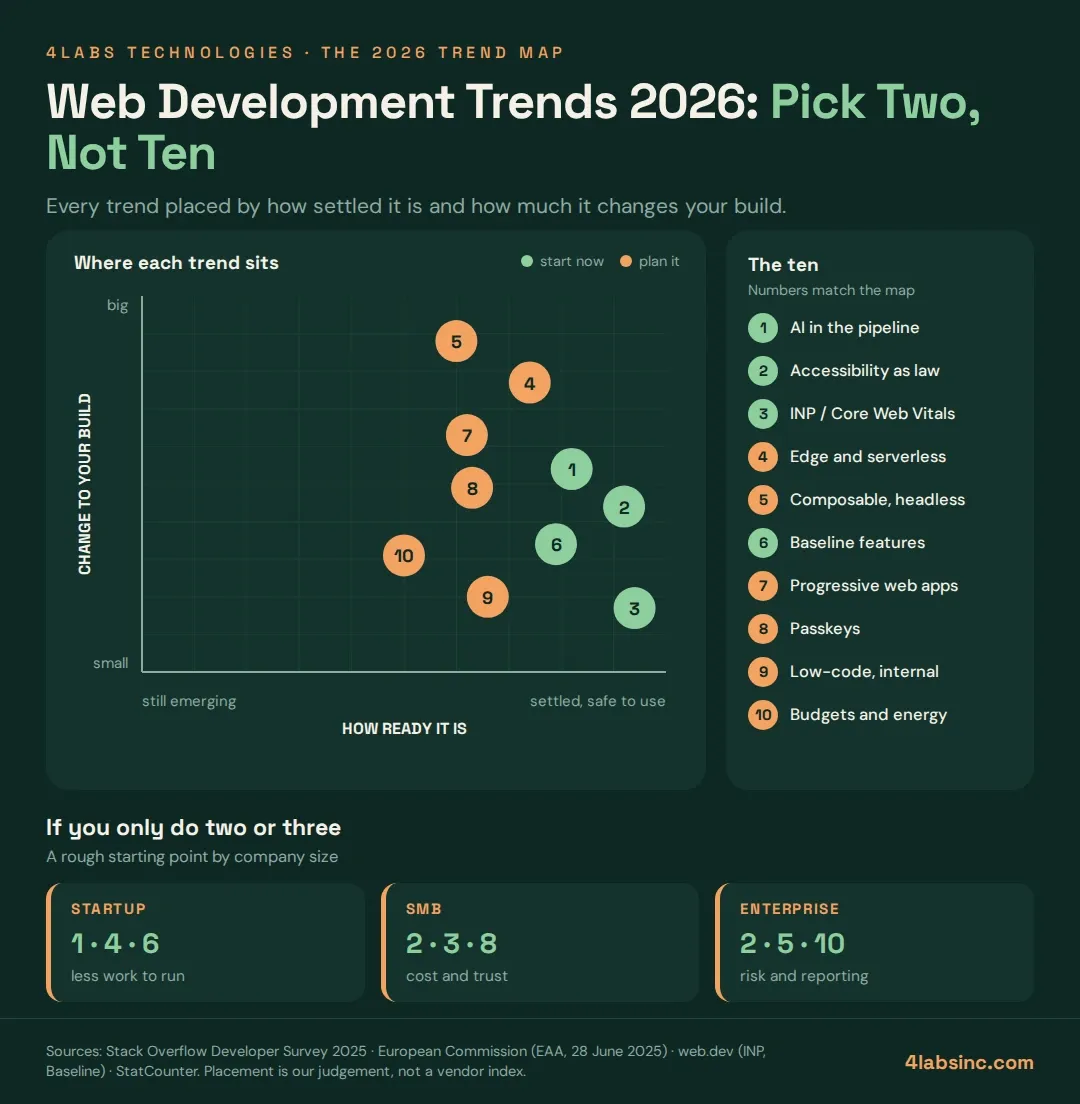
The 10 web development trends to watch in 2026
Each trend gets the same four beats: what it is, why now, who it is for, and what to do this quarter.
1. AI moves from autocomplete into the build pipeline
What it is. AI stopped being a smarter autocomplete and became part of the workflow: scaffolding, test generation, migration scripts, code review, documentation.
Why now. Stack Overflow's 2025 survey of roughly 49,000 developers found 84% using or planning to use AI tools, up from 76% the year before. The same survey found only 3.1% highly trust the accuracy of what these tools produce, while 46% actively distrust it.
That gap is the real story. Adoption is near universal and trust is low, which means the bottleneck moved from writing code to verifying it.
Who it is for. Everyone, but the discipline matters more the bigger the codebase.
This quarter. Write down where AI output is allowed and where it is not, and require a human reviewer named on every AI-assisted change. Teams that skip this get faster commits and slower releases.
2. Accessibility becomes a legal requirement, not a nice-to-have
What it is. Building sites that work with screen readers, keyboards, magnification and poor eyesight, to a published standard rather than a personal opinion.
Why now. The European Accessibility Act has applied since 28 June 2025, covering e-commerce, banking, public transport, e-books and more. The technical yardstick is WCAG, which among other things sets a minimum target size of 24 by 24 CSS pixels and a text contrast ratio of 4.5:1.
Who it is for. Anyone selling into the EU, anyone in public sector supply chains, and any enterprise whose procurement team asks for a conformance statement. Which is now most of them.
This quarter. Run one audit. Fix keyboard navigation, focus states, form labels and contrast first, because those four account for most findings and cost the least to correct.
3. Core Web Vitals shift from load speed to interaction speed
What it is. Interaction to Next Paint, or INP, measures how quickly the page responds after someone taps or clicks. It is a stable Core Web Vital, and good is 200 milliseconds or under at the 75th percentile.
Why now. Load time was the old obsession. Modern sites load quickly and then freeze for half a second when you tap something, because the main thread is busy running JavaScript. INP catches exactly that.
Who it is for. Any site where people do things rather than just read, so every checkout, dashboard, booking flow and configurator.
This quarter. Pull your INP from field data, not a lab test. If it is over 200 ms, look at what runs on the main thread during interaction before you look at anything else. Our note on performance testing covers how to make this a habit rather than a panic.
4. Edge rendering and serverless become the default deployment shape
What it is. Running code close to the user, on managed infrastructure, instead of on servers you size and patch yourself.
Why now. The tooling stopped being exotic. Framework defaults now assume edge or serverless deployment, which means teams get it without choosing it.
Who it is for. Startups and mid-sized teams get the most, because the operational saving is proportionally largest. Enterprises adopt it per-workload, not wholesale.
This quarter. Move one read-heavy, latency-sensitive route to the edge and measure before and after. Do not migrate a stateful service to prove a point.
5. Composable and headless architecture replaces the monolithic CMS
What it is. Content lives in a headless system, the front end is separate, and the two talk through an API. The stack becomes a set of parts you can replace one at a time.
Why now. Most companies publish to more than one surface: web, app, kiosk, partner feed. A monolithic CMS that renders its own pages cannot serve those without duplication.
Who it is for. Content-heavy businesses and anyone running several brands or regions. A five-page marketing site does not need this, and buying it anyway is a common and expensive mistake.
This quarter. If you publish to one surface, skip it. If you publish to three, map who owns each piece of content first, because the hard part is editorial workflow, not the API.
6. The browser platform converges, and Baseline tells you when
What it is. Baseline is a shared label for browser support. A feature is "newly available" once Chrome, Edge, Firefox and Safari all support it, and "widely available" 30 months after that date.
Why now. The old answer to "can I use this yet" was a compatibility table and a gut feeling. Baseline turns it into one word, and it now appears in documentation, linters and editors.
Why it matters commercially. Features that used to need a library are in the platform: container queries, :has(), dialogs, view transitions. Every one you adopt is a dependency you stop maintaining, and shipping less JavaScript is also the cheapest fix for trend 3.
Who it is for. Every team, especially ones carrying a large dependency tree.
This quarter. Audit your CSS and JavaScript dependencies against Baseline. Delete the polyfills that are no longer doing anything. It is the rare piece of work that improves performance and reduces code at the same time. If you are choosing a stack rather than pruning one, our guide to choosing a web development framework runs the decision properly.
7. Progressive web apps grow up quietly
What it is. A website that installs to the home screen, works offline and sends notifications, without an app store between you and the user.
Why now. PWAs have been on trend lists since 2017, which is why people tune them out. What changed is that the platform support finally stopped being the interesting part. Teams now choose a PWA because distribution is simpler, not because the technology is new.
Who it is for. Products with repeat usage and no need for deep device features. Retail, booking, internal tools, content apps.
This quarter. If you were about to build a simple companion app, price the PWA first. If you need camera, Bluetooth or background processing, read our comparison of native and hybrid mobile apps before committing.
8. Passkeys start replacing passwords
What it is. Sign-in backed by the device, using the same face or fingerprint check people already use to unlock the phone. No password to remember, reuse or leak.
Why now. All major platforms and browsers now support it, and the account-recovery flows that used to be the blocker have matured. Phishing-resistant sign-in stops being a security project and becomes a sign-up-conversion project.
Who it is for. Anything with accounts. The gain is biggest where password resets are a real support cost.
This quarter. Offer passkeys alongside your existing login rather than replacing it. Watch the adoption rate before you plan the retirement. Pair this with the basics in our note on securing your website against cyber threats.
9. Low-code and no-code find their real boundary
What it is. Building with visual tools instead of writing code, now sharpened by AI assistance inside those tools.
Why now. The hype cycle finished and the boundary settled. Low-code wins for internal tools, admin panels, forms, workflows and quick validation. It struggles when a product needs custom logic, real scale, or an exit path.
Who it is for. Operations teams, and startups testing an idea before building it. Not your core product.
This quarter. Pick one internal tool that a developer is currently maintaining and move it. Agree upfront what would trigger a rebuild in code, so the decision is made before the platform makes it for you.
10. Performance budgets and green hosting become the same conversation
What it is. A hard limit on page weight, script size and third-party requests, tracked in the build like a test.
Why now. Two pressures arrived together. Lighter pages score better on Core Web Vitals, and lighter pages use less energy, which is now a question in enterprise procurement and sustainability reporting.
Who it is for. Enterprises answering sustainability questionnaires, and anyone whose site has grown a third-party tag for every department.
This quarter. Set a budget for JavaScript and total page weight. Make the build fail when it is exceeded. Then audit the third-party scripts, because that is where the weight usually hides and nobody owns them.