How to Secure a Website: 12 Best Practices
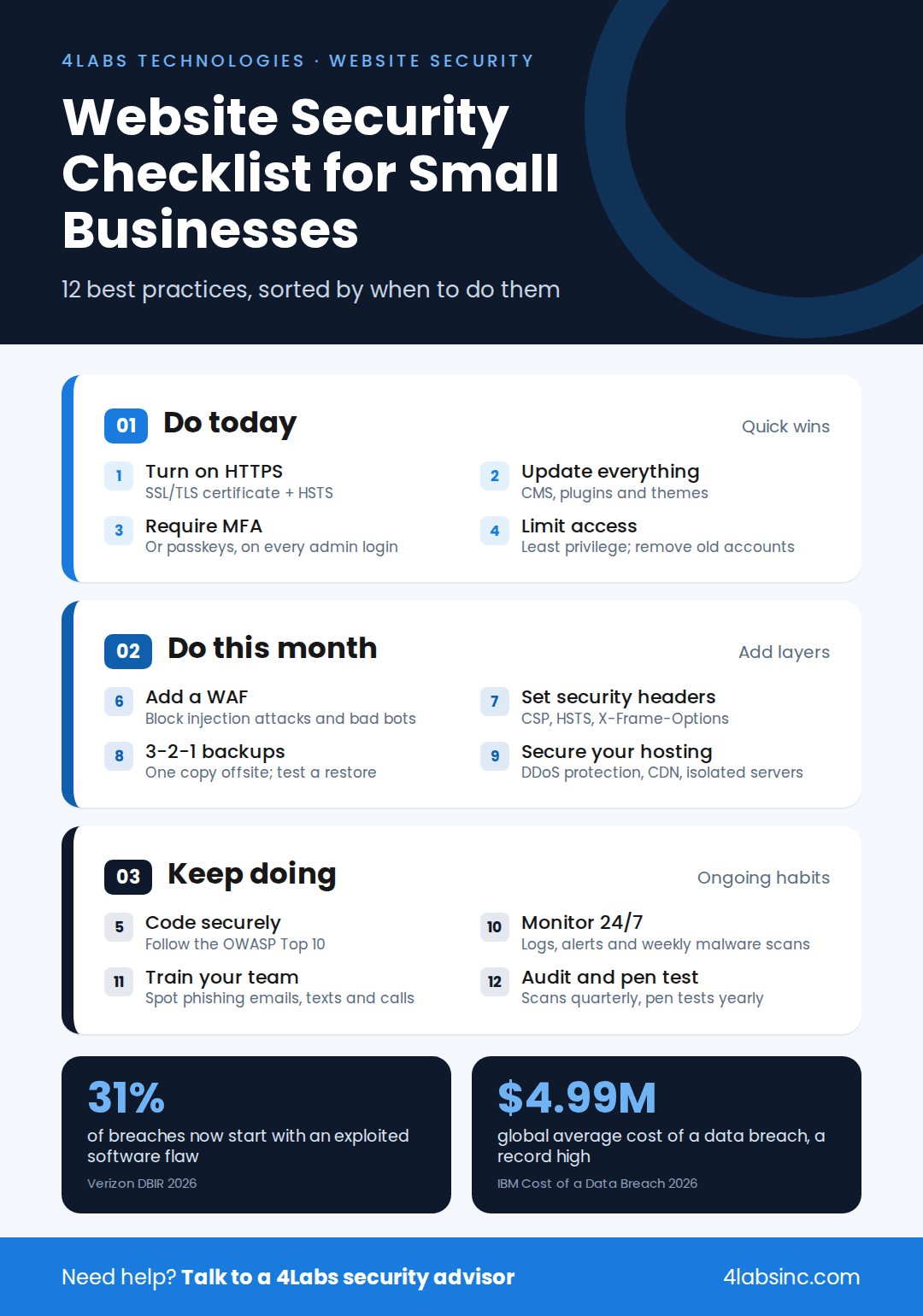
The practices below run from quick wins to ongoing habits. Start with the "do today" items in the checklist, then work down the list. Each step closes a gap attackers use every day.
1. Use HTTPS With an SSL/TLS Certificate
An SSL/TLS certificate encrypts data as it moves between your site and your visitors. It turns HTTP into HTTPS and adds the padlock in the browser bar. Without it, logins, form entries and card details can be read in transit.
Most hosts now offer free certificates, so cost is no excuse. Once HTTPS is live, redirect all HTTP traffic to it. Then turn on HSTS, a setting that tells browsers to always use the secure version of your site.
2. Keep Your CMS, Plugins and Server Software Updated
Outdated software is the easiest way in. When a vendor fixes a flaw, attackers study the patch and go after sites that haven't installed it yet. That's why vulnerability exploitation now tops Verizon's list of breach entry points.
Turn on automatic updates for your CMS, themes and plugins where you can. Check server software and libraries every month. Delete plugins and themes you no longer use, because an inactive plugin can still be exploited. This simple patch management habit blocks a large share of attacks.
3. Turn On MFA and Use Strong Passwords or Passkeys
A stolen password shouldn't be enough to take over your site. Multi-factor authentication (MFA) asks for a second proof, such as a code from an app or a security key. Passkeys go further and replace passwords with a secure sign-in tied to a device.
Require MFA for every admin, editor and hosting account. Ask your team to use a password manager so each login is long and unique. This shuts down credential stuffing, where attackers try passwords leaked from other sites.
4. Give Users Only the Access They Need
Not everyone needs admin rights. The principle of least privilege means each person gets only the access their job requires. A content writer can publish posts without touching plugins or payment settings.
Review user accounts every quarter. Remove former staff and old agency logins right away. This is the core idea behind zero trust: never assume an account is safe just because it's already inside.
5. Build With Secure Coding Practices
Many attacks target flaws in the code itself. Secure coding means checking every input and using safe, parameterized database queries. It also means encoding output before it reaches the page. These steps stop SQL injection and cross-site scripting at the source.
Ask your developers to follow the OWASP Top 10:2025, the standard list of the most serious web app risks. Broken access control sits at number one, followed by security misconfiguration and software supply chain failures. Building a new site? Pick a team that offers secure web application development. The team should also build security testing into the software development lifecycle.
6. Add a Web Application Firewall (WAF)
A web application firewall sits between your site and the internet. It inspects incoming traffic and blocks harmful requests, such as SQL injection attempts and bad bots, before they reach your server.
Many WAFs also offer virtual patching. That means they can block an attack on a known flaw while you wait for the official fix. For a small business, a cloud-based WAF is usually the fastest and most affordable option.
7. Set Up Security Headers
Security headers are short instructions your server sends to the browser. They cost nothing and take little time to add, yet many small business sites skip them.
Start with these four:
- Content-Security-Policy (CSP) limits which scripts can run, which blocks most XSS attacks.
- Strict-Transport-Security (HSTS) forces HTTPS on every visit.
- X-Frame-Options stops other sites from loading yours in a hidden frame.
- X-Content-Type-Options stops browsers from guessing file types in unsafe ways.
Test your headers with a free online scanner after each change.
8. Back Up Your Website Using the 3-2-1 Rule
Backups are your safety net when everything else fails. The 3-2-1 rule keeps it simple: hold three copies of your data, on two types of storage, with one copy offsite.
Keep at least one backup offline or locked so ransomware can't reach it. Back up daily if your site changes often. Most important, test a full restore every few months. A backup you've never restored is only a hope.
9. Choose Secure Hosting With DDoS Protection
Your host is the foundation of your website security. A good host patches its servers, isolates each account and blocks DDoS attacks before they reach you.
Ask your provider about firewalls, malware scanning, backups and uptime guarantees. A content delivery network (CDN) adds another layer by spreading traffic across many servers. If your site runs in the cloud, cloud security services help lock down settings that are easy to get wrong. Growing businesses may also need managed IT infrastructure that scales safely.
10. Monitor Traffic, Logs and Malware Around the Clock
You can't stop what you can't see. Monitoring tools watch for odd login attempts, traffic spikes and file changes. Intrusion detection systems flag behavior that looks like an attack in progress.
Set alerts for failed logins, new admin users and changes to core files. Run a malware scan at least weekly. Keep security logs for months, not days, so you can trace what happened after an incident. Larger teams often rely on a security operations center (SOC) to watch alerts 24/7.
11. Train Your Team to Spot Phishing
Technology can't fix every human mistake. One click on a fake login page can hand over the keys to your site. Attackers now use texts and phone calls as well as email. Verizon found that these mobile scams succeed 40% more often than email phishing.
Run short training sessions a few times a year. Teach staff to check sender details, avoid unknown links and report anything odd. Set clear rules for AI tools, too. Staff should never paste passwords, customer data or site code into unapproved apps.
12. Run Regular Security Audits and Penetration Tests
A security audit checks your site against known risks and best practices. A penetration test goes further. An ethical hacker tries to break in, just as a real attacker would, and shows you what they found.
Run a vulnerability assessment every quarter and a penetration test at least once a year. Test again after any redesign, new feature or platform move. Pair these checks with regular IT audits for compliance if you handle payments or health data. Professional security testing services can find flaws that automated scanners miss.
Want to know how your website holds up? Get a website security audit and penetration test from the 4Labs security team. You'll get a clear report and a fix plan ranked by risk. Book a Security Audit