Attackers no longer wait. In Mandiant's M-Trends 2026 report, the gap between a first break-in and the hand-off to a second attack group fell to 22 seconds. In 2022 it took more than eight hours.
Nobody watches a dashboard that fast. That is the job of a security operations center. A SOC is the team and setup that watch your systems day and night, spots the odd behavior early and shuts it down before it spreads.
This guide explains the role of a security operations center in a modern cyber security strategy. You'll see what a SOC does each day, who works on the SOC team, which tools it runs, how to measure it, and when a growing business should build one or buy managed SOC monitoring as a service.
Key takeaways
- A security operations center (SOC) is a team, a process and a toolset that monitors, detects, investigates and responds to cyber threats around the clock.
- Six core jobs: monitor, triage, investigate, contain, recover and harden.
- A typical SOC runs on Tier 1, Tier 2 and Tier 3 analysts, plus a manager and security engineers.
- Judge a SOC on MTTD, MTTR and dwell time, not on how many alerts it closes.
- Most small and mid-sized businesses buy SOC coverage as a service instead of staffing three shifts.
What Is a Security Operations Center (SOC)?
A security operations center (SOC) is a team of security specialists who watch an organization's systems around the clock. They collect signals from laptops, servers, cloud accounts and email, look for signs of attack, and respond when something is wrong. A SOC runs on three things working together: people, process and technology.
The people are analysts, engineers and a manager. The process covers how alerts are ranked, escalated and closed. The technology pulls logs into one place and flags what looks unusual. A SOC can sit in your own office, run from a provider's site, or work as a mix of both. Whatever the setup, the aim never changes: find trouble early and stop it before it spreads through your managed IT infrastructure services.
SOC vs. NOC: What's the Difference?
Both teams watch systems all day, so people mix them up. A network operations center (NOC) keeps services running. A SOC keeps attackers out.
| Factor | Security operations center (SOC) | Network operations center (NOC) |
|---|---|---|
| Main goal | Stop threats and limit damage | Keep systems available and fast |
| Typical alert | Odd login from a new country | Server down or link saturated |
| Team | Security analysts and threat hunters | Network and systems engineers |
| Core tools | SIEM, EDR, threat intelligence | Monitoring and ticketing tools |
| Question asked | Is someone attacking us? | Is anything broken or slow? |
Larger companies run both and share information between them. Our guide to the network operations center (NOC) covers that side in detail.
The Role of a Security Operations Center in Modern Cybersecurity
The role of a security operations center has grown because attacks now move faster than any part-time IT schedule can handle.
Attacks Move Faster Than Teams Can React
M-Trends 2026 found that attackers pass stolen access to a second group in about 22 seconds. Once inside, they stay hidden for a while: the global median dwell time rose to 14 days in 2025, up from 11 days the year before. Worse, 48% of breaches were still spotted by someone outside the business, not the business itself. A SOC exists to close that gap and find the intruder first.
Alerts Pile Up Faster Than Anyone Can Read Them
Security tools are noisy. Most alerts turn out to be harmless, and the real one hides in the pile. The SANS SOC Survey 2025 found that 85% of teams respond mainly to endpoint alerts rather than their central log platform, and 69% still build their reports by hand. Without a clear triage process, alert fatigue sets in and warnings get ignored.
One Missed Alert Gets Expensive
IBM put the global average cost of a data breach at a record $4.99 million in 2026, and reported a 56% rise in AI-driven attacks. A small business will lose less in dollars, but downtime, lost customers and recovery work still hurt. Faster detection shrinks all of it.
What Does a SOC Do? Six Core Jobs
A SOC monitors your systems, sorts the alerts, investigates the real ones, contains attacks, helps you recover and then fixes the weak spots. Here is each job in plain terms.
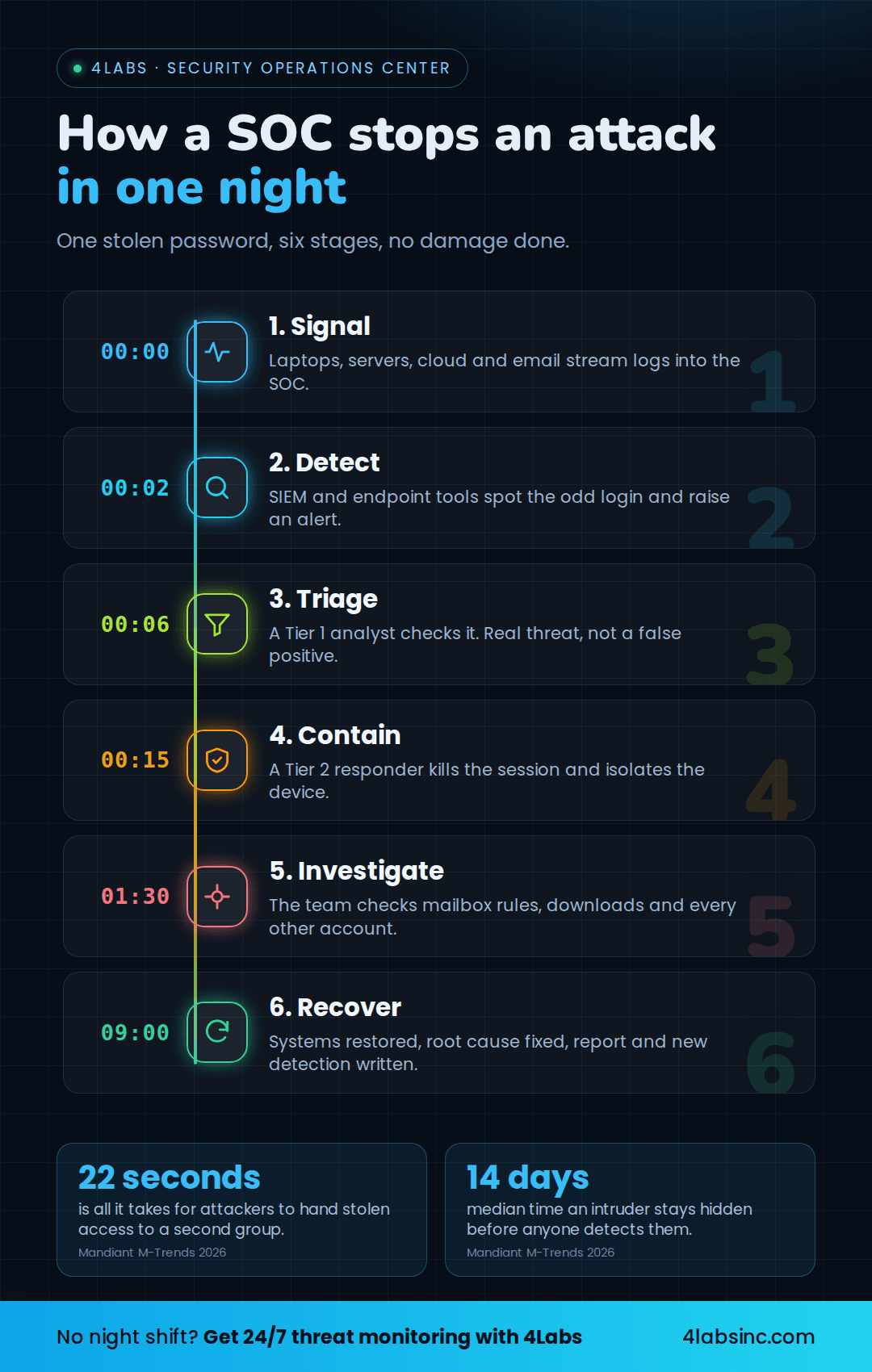
How a SOC stops an attack in one night.
1. Monitor Everything, 24/7
The SOC collects logs and signals from every corner of your business: laptops, servers, firewalls, cloud accounts, email and applications. Those feeds land in one platform so nothing hides in a silo.
Coverage matters more than volume. If a system sends no logs, the SOC is blind to it. Good teams map every asset first, then check that each one reports in. Solid network security gives that monitoring something clean to watch.
2. Triage Alerts and Cut the Noise
Monitoring creates alerts, and most of them are harmless. Triage is the work of sorting them fast: real or false positive, urgent or routine.
Tier 1 analysts handle this queue. They enrich each alert with context, such as who the user is and whether the device is patched. Clear rules and tuned detections keep the noise down, which protects the team from alert fatigue.
3. Investigate and Hunt Threats
When an alert looks real, the SOC digs in. Analysts trace what happened, which accounts were used and what the attacker touched. They map the behavior to known tactics using frameworks such as MITRE ATT&CK.
Good teams also hunt without an alert. They search for quiet signs of intrusion, guided by threat intelligence on current attacker methods. That is how long-running, low-noise attacks get found.
4. Respond and Contain
Speed decides the damage. The SOC follows a written playbook: isolate the device, disable the account, block the IP address, reset the credentials. Each step is recorded.
Severe incidents escalate to senior responders and, when needed, to management and legal. A tested incident response plan means nobody improvises at 3 a.m.
5. Recover and Report
After containment, the SOC helps bring systems back safely and confirms the attacker is gone. Then it writes up what happened, what was affected and what stopped it.
Those reports do double duty. They feed better detections, and they provide the evidence auditors ask for. Pair them with regular IT audits for compliance to keep frameworks such as ISO 27001, PCI DSS and HIPAA on track.
6. Harden Defenses Before the Next Attack
Every incident points to a gap. The SOC turns that lesson into action: patch the flaw, tighten a rule, remove an unused account, add multi-factor authentication where it was missing.
Vulnerability management belongs here too. So do safer engineering habits, from website security best practices to security testing in the software development lifecycle.
A Day in the SOC: How One Alert Becomes an All-Clear
Here is how a typical case runs. The example below is a composite, not one client's incident. An employee clicks a fake invoice link at 1 a.m. and enters their password.
- 00:00 – The signal. The login succeeds from a new country on an unknown device. The identity platform and the laptop agent both send events to the SOC.
- 00:02 – The alert. Detection rules flag the impossible travel: the same account signed in from two places hours apart. The alert reaches the queue with a high score.
- 00:06 – Triage. A Tier 1 analyst checks the account, the device and recent activity. The user is asleep at home, so this is not a false positive. The analyst escalates.
- 00:15 – Containment. A Tier 2 responder disables the session, forces a password reset and isolates the laptop from the network. The attacker loses access.
- 01:30 – Investigation. The responder checks mailbox rules, file downloads and any other account the attacker tried. Two forwarding rules are found and removed.
- 09:00 – Recovery and report. The laptop is rebuilt, the user gets a new password and a short briefing. The SOC writes up the incident and adds a detection for that phishing kit.
Without a SOC, that same login often sits unnoticed for days. M-Trends 2026 put the median dwell time at 14 days, which is plenty of time to read email, move sideways through your systems (lateral movement) and prepare ransomware.
Who watches your alerts at 2 a.m.? See what round-the-clock monitoring would cover for your business. Talk to a Security Advisor
Who Works in a SOC? Roles and Responsibilities
SOC roles and responsibilities are usually split into tiers. Each tier picks up what the one below cannot finish, so simple alerts get cleared fast and hard cases reach the right expert.
| Role | Main job | Hands over to |
|---|---|---|
| Tier 1 analyst | Watches the queue, triages alerts, filters false positives | Tier 2 |
| Tier 2 responder | Investigates real incidents, contains them | Tier 3 or management |
| Tier 3 threat hunter | Hunts hidden threats, handles major incidents, digital forensics | SOC manager |
| SOC manager | Runs shifts, sets priorities, reports to the business | Executives |
| Security engineer | Builds and tunes the tools and detections | The whole team |
Tier 1: Alert Triage Analyst
Tier 1 is the front door. These analysts scan incoming alerts, add context and decide what is real. They clear the noise and pass anything suspicious upward with clear notes. Good Tier 1 work saves the whole team hours.
Tier 2: Incident Responder
Tier 2 takes confirmed incidents. They dig into logs, work out how far the attacker got, then contain the damage by isolating devices and locking accounts. They also decide when to escalate to management overnight.
Tier 3: Threat Hunter and Forensics
Tier 3 handles the hardest work. They hunt for threats no alert caught, reverse-engineer malware and lead the response to major incidents. They also find root causes, so the same attack does not work twice.
SOC Manager, Engineers and Compliance Support
The SOC manager owns staffing, shift cover, playbooks and reporting. Security engineers keep the platforms healthy and tune detections to cut false positives. Many SOCs also support audits and compliance reporting, since the evidence lives in their logs.
A 24/7 in-house roster needs roughly 8 to 12 trained people across all these roles. That headcount is why most small and mid-sized businesses share a SOC through a provider.
What Tools Does a SOC Use?
A SOC runs on a small stack of platforms that collect data, spot patterns and speed up response. You don't need every tool on day one.
| Tool | What it does | Why it matters |
|---|---|---|
| SIEM (security information and event management) | Collects logs from everywhere and correlates them | One place to search when something looks wrong |
| EDR/XDR (endpoint or extended detection and response) | Watches laptops, servers and cloud workloads | Catches malware and odd behavior on the device |
| SOAR (security orchestration, automation and response) | Automates repeat steps in a playbook | Cuts response time and manual effort |
| NDR (network detection and response) | Watches network traffic for unusual movement | Finds attackers moving between systems |
| Threat intelligence | Feeds current attacker methods and indicators | Helps the team hunt for what is active now |
| Case management | Tracks each incident and its evidence | Supports audits and cleaner handovers |
Cloud accounts need their own coverage. Cloud security services close the settings gaps that generic monitoring misses.
8 Security Operations Center (SOC) Best Practices and Strategies for 2026
These security operations center best practices separate a SOC that works from one that just makes noise.
- Map what you are protecting first. List your systems, data and accounts, then confirm each one sends logs. You cannot watch what you never onboarded.
- Write playbooks for your top five incidents. Phishing, stolen credentials, ransomware, a lost device and cloud misconfiguration cover most real cases. A written playbook removes guesswork at 3 a.m.
- Tune detections every month. Retire rules that only produce false positives, and add rules from real incidents. Tuning is how you beat alert fatigue.
- Automate the boring steps. Enriching alerts, checking reputations and opening tickets can run without a human. Keep people for decisions, not copy and paste. Our post on automation in IT infrastructure covers the same idea beyond security.
- Follow a recognized framework. NIST CSF 2.0 gives you the structure, and MITRE ATT&CK gives you a shared language for attacker behavior. Auditors know both. Both frameworks pair well with zero trust, where no account or device is trusted by default.
- Hunt, don't only wait. Book a few hours each week for threat hunting. Some of the worst intrusions never trigger an alert.
- Test the plan before you need it. Run a tabletop exercise twice a year and a live drill once a year. Fix what breaks in the drill, not in the incident. Many gaps show up first in common IT audit findings.
- Report in business terms. Share detection and response times, incidents handled and risks closed. Owners fund what they can understand.
SOC Metrics That Prove It Is Working
Alert counts prove nothing. These five numbers show whether your security operations center is doing its job.
| Metric | What it measures | What good looks like |
|---|---|---|
| MTTD (mean time to detect) | How long from first sign to alert | Minutes, not days |
| MTTR (mean time to respond) | How long from alert to containment | Under an hour for serious cases |
| Dwell time | How long an attacker stayed hidden | Far below the 14-day global median |
| False positive rate | Share of alerts that were harmless | Falling month over month |
| Log coverage | Share of systems sending data | Above 95% of known assets |
In-House, Outsourced or Hybrid SOC?
You can build a SOC, buy it as a service, or split the work. The right answer depends on budget, staff and how much risk you carry.
| Factor | In-house SOC | Outsourced SOC (SOC as a service) | Hybrid |
|---|---|---|---|
| Setup time | Months | Weeks | Weeks to months |
| Cost | Salaries for 8 to 12 people, plus tools and licenses | Monthly fee per user or device | Mixed |
| Night cover | You staff three shifts | Included | Provider covers nights |
| Business context | Deep | Builds over time | Deep, with outside help |
| Best for | Large or highly regulated firms | Small and mid-sized businesses | Firms with a small internal team |
The cost drivers are the same either way: headcount, tooling licenses, log storage and the price of covering nights and weekends. Buying managed security services spreads those costs across many clients, which is why it usually lands cheaper for an SMB.
When Does a Small Business Need a SOC?
You need SOC coverage once an unnoticed intrusion would seriously hurt you. These signs say the time has come:
- You store customer, payment or health data.
- You must meet rules such as PCI DSS, HIPAA, GDPR or ISO 27001.
- Nobody is watching alerts outside office hours.
- Your team works remotely, on their own devices and networks.
- You have already had an incident, or a close call.
- Your insurer or a large customer asks how you monitor threats.
- Your IT person handles security in the gaps between other work.
If two or more apply, move monitoring up your list.
Not sure whether to build or buy? Get a SOC readiness review and a clear recommendation for your size and budget. Get a SOC Readiness Review
How 4Labs Runs Security Operations for Growing Businesses
4Labs Technologies gives small and mid-sized businesses the security operations coverage that used to need a full in-house team.
- 24/7 threat monitoring through fully managed cybersecurity services, so alerts get handled at any hour.
- Detection and response engineering across SIEM and SOAR platforms, endpoints, identity and network detection and response (NDR).
- Threat hunting and incident readiness, including identity threat detection and response (ITDR) and attack surface management.
- Incident response retainer, so a trained team is ready the moment something goes wrong.
- Compliance support for ISO 27001, SOC 2, PCI DSS, HIPAA and GDPR reporting.
- Co-managed and vCISO options when you already have an IT lead who needs backup and senior guidance.
See this in practice in our cybersecurity case study for a decentralized provider.
Get security operations without hiring a night shift. 24/7 threat monitoring, faster response and clear monthly reporting. No commitment required. Talk to a Security Advisor
Security Operations Center FAQs
What does SOC stand for in cybersecurity?
SOC stands for security operations center. It is the team and setup that monitor an organization's systems for cyber threats, investigates alerts and responds to incidents. A SOC can run in-house, from a provider, or as a mix of both. In audit work, SOC also refers to SOC 2 reports, which are unrelated audit reports.
What is the main role of a security operations center?
The main role of a security operations center is to spot and stop attacks before they cause damage. It watches systems around the clock, sorts alerts, investigates the real ones, contains incidents and helps the business recover. It also feeds lessons back so the same attack does not work twice.
What is the difference between a SOC and a NOC?
A SOC protects against attackers. A NOC, or network operations center, keeps systems available and fast. A SOC asks whether someone is attacking you; a NOC asks whether anything is broken or slow. Larger businesses run both and share information between the two teams.
Do small businesses need a security operations center?
Most small businesses need SOC coverage once an unnoticed intrusion would hurt them, but very few need to build one. If you store customer or payment data, face compliance rules, or have nobody watching alerts at night, buy the coverage as a service. That gives you round-the-clock monitoring without hiring three shifts of analysts.
How much does a SOC cost to run?
An in-house SOC needs roughly 8 to 12 trained people for 24/7 coverage, plus tool licenses and log storage. Outsourced SOC services charge a monthly fee, usually per user or per device, which spreads those costs across many clients. Ask any provider what hours, systems and response times the fee covers.
What is SOC as a service?
SOC as a service means a provider runs security monitoring and response for you. Their analysts watch your systems on their platform, follow agreed playbooks and report to you. You get 24/7 coverage and specialist skills without recruiting a team, while your staff keep control of business decisions.
Which metrics show a SOC is working?
Watch mean time to detect (MTTD), mean time to respond (MTTR) and dwell time. Falling numbers mean threats are caught and stopped faster. Also track the false positive rate and log coverage, since a quiet SOC with blind spots only looks effective.
Watching Beats Waiting
A security operations center turns scattered alerts into an early warning system. It watches every system, sorts the noise, investigates what matters and shuts attacks down while they are small.
You do not need a room full of screens to get that. Start with full log coverage, clear playbooks and someone on duty at night. Follow the security operations center best practices above, measure what changes, and improve from there.
Ready to see what round-the-clock cover looks like for your business? Talk to a Security Advisor