1. On-device and generative AI features people actually use
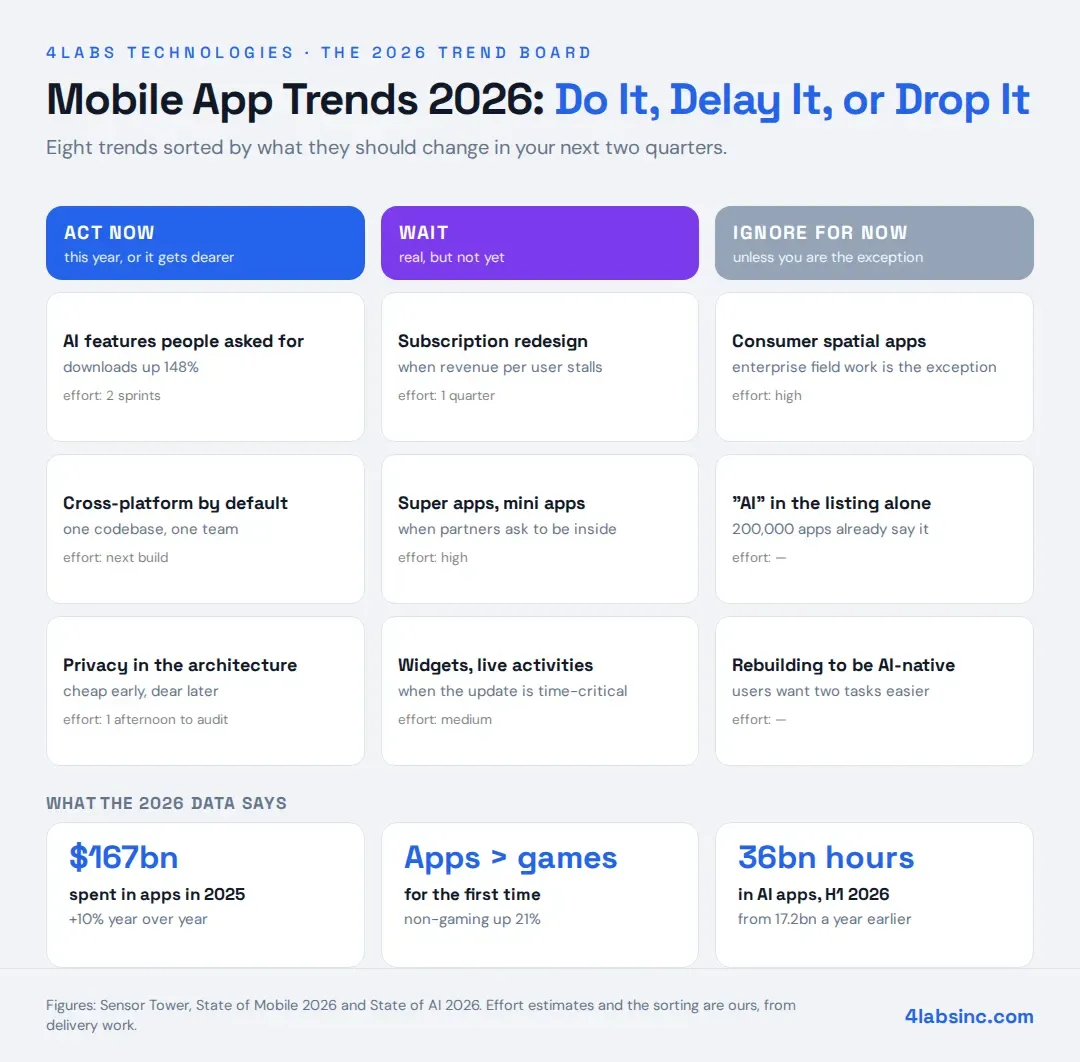
The only trend on this list with user behaviour behind it rather than developer enthusiasm. Downloads of AI apps rose 148%, and time spent in them is on course to double.
What that does not mean is that your mobile app needs a chat box. The word AI appears in over 200,000 store listings, so it differentiates nothing on its own. What works is a specific job your users already do slowly: summarising what they missed, drafting the thing they always draft, searching in plain language instead of through five filters, sorting a photo library by what is in the photos.
On-device inference matters more than the model name. Running small models locally keeps latency low, works offline, sends nothing to a server, and costs you no tokens per user. Both platforms now ship capable on-device model support, which is why this stopped being research and became a sprint. Our post on the role of AI in mobile app development covers the implementation side.
What to do: pick the one task users complain about most, and prototype it. One feature shipped beats five announced.
2. Cross-platform as the default, native as the exception
The question flipped. It used to be "can we get away with cross-platform?" Now it is "is there a reason this has to be native?"
For most business mobile apps — booking, ordering, dashboards, internal tools, marketplaces — React Native, Flutter or Kotlin Multiplatform produce an app users cannot distinguish from native, from one codebase and one team. That is the whole argument, and for a startup it is decisive.
Native still wins where the app lives close to the hardware: heavy camera or video processing, complex gestures, background work with tight battery constraints, or anything that needs a new platform API the day it ships. Our comparison of native versus hybrid app development goes through the trade-offs properly.
What to do: if you are starting a new app, make cross-platform the default and require a reason to go native. If you already run two native codebases and both work, leave them alone. Rewrites are the most expensive way to adopt a trend.
3. Personalisation that runs on behaviour, not demographics
Useful mobile app personalisation now means what a person did in your app last week, not which segment a form put them in. Reordering a home screen around the three features someone uses, defaulting to their usual branch or size, timing a notification to when they normally open the app.
This is a small-data trend, which is why it suits smaller teams. You do not need a machine learning platform to notice that a user opens the app on Thursday evenings and always orders the same thing. Our guide to user-friendly mobile app UX design covers how to make the adaptation feel helpful rather than unpredictable.
What to do: instrument three behaviours you would act on, then act on one of them. The instrumenting is the part teams skip.
4. Privacy as an architecture choice, not a policy page
Permission prompts, tracking transparency and data minimisation are not compliance chores any more. They shape what data you can build on, and users decline more than they used to.
The design response is to need less. Keep what you can on the device. Ask for a permission at the moment the user wants the thing it enables, not at launch. Explain the trade in one line. Apps that ask for location at first open get refused; apps that ask when someone taps "find my nearest branch" get granted.
What to do: list every permission your mobile app requests and the feature that justifies it. Anything without a justification comes out before your next release.
5. Subscription and purchase design as a product discipline
With $167 billion moving through in-app purchases and non-gaming apps now taking the larger share, how you price and present a purchase is product work, not a settings screen.
The details that move revenue are unglamorous. Where the paywall sits in the first session. Whether a trial asks for card details. How clearly the app says what the free tier includes. Whether cancelling is easy, which sounds counterproductive and improves retention because people trust it.
What to do: if revenue per user is flat, this is your quarter's work. If you are pre-revenue, skip it until you have users to price for.
6. Performance on the devices your users actually own
Not a trend so much as a standing obligation that trend lists keep rediscovering. Cold start time, scroll smoothness, battery drain and app size decide retention more reliably than any feature.
The mistake is testing on the newest phone on the team's desk. Check your analytics for the devices and connection speeds your users actually have. The median is usually three years older and slower than the team assumes, and a mobile app that feels instant in the office can be unusable on a mid-range handset. Our guide to mobile app performance and speed covers the measurements worth taking.
What to do: set a cold start budget and an app size budget, then fail the build when either is breached. Treat it as continuous, not as a project.
7. Super apps and mini apps, where the market allows them
One app hosting many services, with third-party mini apps running inside it. Dominant in parts of Asia, and the model everyone else keeps predicting.
Outside those markets it needs conditions almost nobody has: enormous daily traffic, payments already inside the app, and a platform relationship that permits hosted third-party code. Both app stores have specific rules here, and they move.
What to do: for most companies, nothing. If you run a marketplace or a payments app with millions of daily users and partners asking to be inside it, the conversation is real. Otherwise it is a strategy slide.
8. Spatial and wearable surfaces, honestly assessed
Headsets and smart glasses are genuinely improving, and the enterprise cases are real: field service, warehouse picking, guided maintenance, clinical training. Watches and wearables carry useful companion experiences for fitness, transit and payments.
What has not happened is consumer scale. The installed base is small relative to phones, and a spatial app is a new product with its own design language, not a port of your existing one.
What to do: if you sell into field operations or training, run a pilot with a named customer. Everyone else should keep reading about it and building nothing.