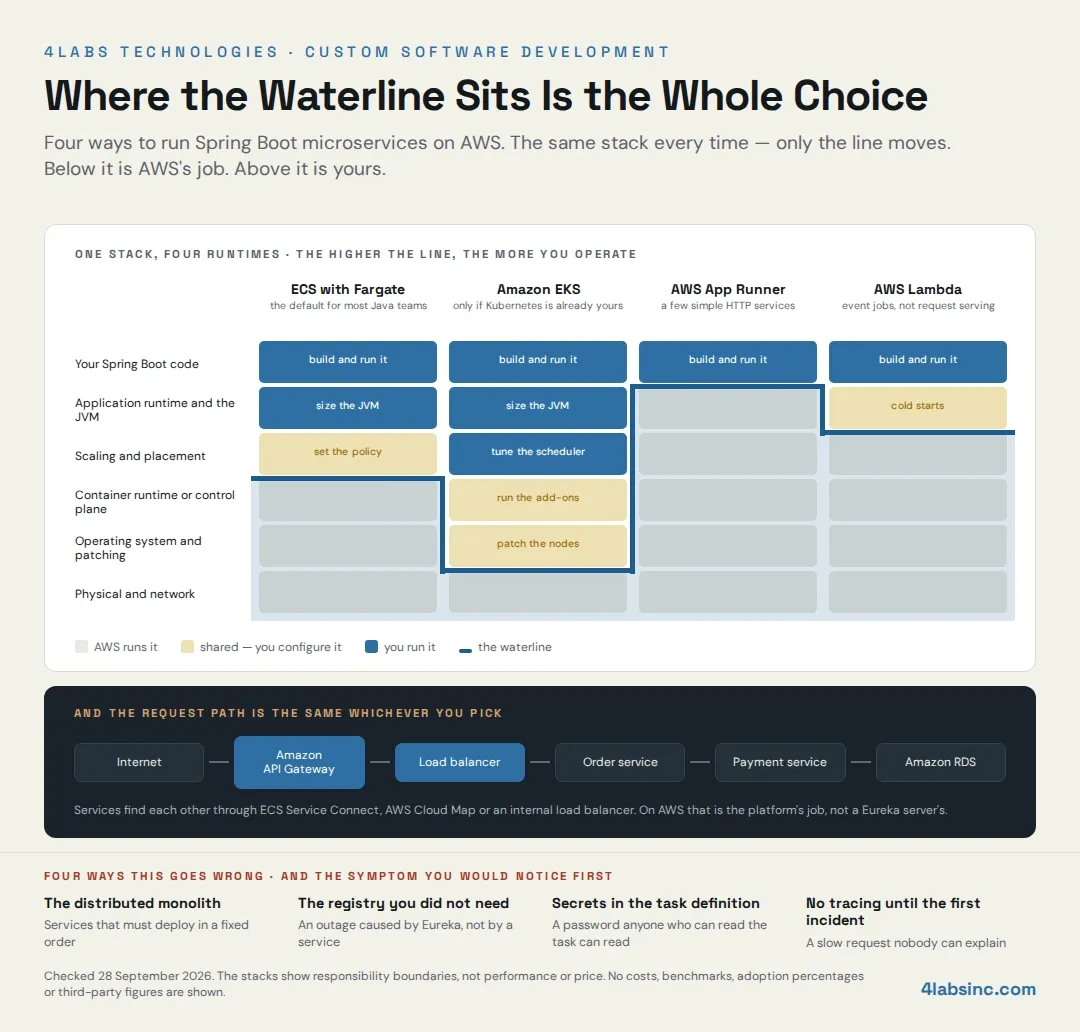
A team can get Spring Boot microservices on AWS working in a fortnight. Three services, a container each, a load balancer in front, and the demo goes green. The hard part arrives four months later, when somebody is on call for it.
What separates those two outcomes is not the steps. The steps are well documented and mostly the same wherever you read them. It is four choices made inside the steps, usually in a hurry: where the services run, how they find each other, where configuration and secrets live, and what you can see when something breaks at two in the morning.
This guide gives you the ten steps. It also gives you the reasoning inside each one, so you can tell whether the default is right for your estate or just right for a tutorial. You get a comparison of the four AWS runtimes, a straight answer on whether you still need a Eureka server, and the production work that guides like this one usually stop short of.
One correction before we start, because it shapes several steps. A lot of Spring Boot microservices material teaches Eureka service discovery on Amazon ECS, and on AWS that is usually redundant. The platform registers and resolves your services already, and running a registry on top means operating something you were handed for free. There are cases where Eureka still earns its place, and they are named later on this page.
We build this for SMB and enterprise clients as part of our custom software development services, so the recommendations here are the ones we make when it is our own delivery team on the hook.
What a Spring Boot microservices architecture on AWS actually consists of
The phrase covers two separate things, and teams get into trouble when they only plan one of them.
The first is the application. A set of Spring Boot services, each owning one business capability and its own data, each deployable without the others. The second is the platform underneath. Compute, networking, a container registry, data stores, a secrets store, a pipeline and somewhere the logs go.
Most of the effort in a first delivery goes into the second thing, which surprises teams who scoped the first.
The Spring Boot side: services, Spring Boot Actuator and Spring Cloud
A service here is a normal Spring Boot application. It exposes a REST API, talks to its own database through Spring Data JPA, and knows nothing about how it is deployed.
Three things are worth building in from the first service rather than retrofitting.
Spring Boot Actuator gives you health and readiness endpoints. The platform uses these to decide whether a container is alive and whether to send it traffic. Without them your load balancer finds out a service is broken by sending users to it.
A metrics export. Actuator publishes metrics through Micrometer, and Micrometer can write to CloudWatch. Wire it once in a shared parent and every service gets it.
A correlation ID on every request, propagated to every downstream call. This is a small piece of code and it is the difference between reading one trace and reading six log files.
Spring Cloud is more selective. The configuration server, the Eureka server and the client-side load balancer were designed for a world where the platform gave you none of that. On AWS the platform gives you all three. What is still worth having is Resilience4j for circuit breakers and timeouts, and OpenFeign if you like declarative clients, so take those and leave the rest.
The AWS side: the platform pieces every service needs
Six pieces, and each one is a decision you will live with.
Compute is where the container actually runs. Amazon ECS with AWS Fargate, Amazon EKS, AWS App Runner or AWS Lambda. The next section compares them, because this is the choice everything else hangs off.
A registry holds your images: Amazon ECR, in the same account and region as the compute.
The network is a VPC with private subnets for the services, public ones for the load balancer only, and security groups that let a service talk to exactly what it needs.
Data is one store per service: Amazon RDS for relational data, and Amazon S3 for anything file-shaped. A shared database across services is the most common way a microservices architecture turns back into a monolith.
Configuration and secrets go in AWS Systems Manager Parameter Store and AWS Secrets Manager, never in the image and never in the task definition.
Observability is CloudWatch for logs, metrics and alarms, plus AWS X-Ray or an OpenTelemetry collector for distributed tracing across services.
Why microservices is an organisational decision before it is a technical one
The test is simple. Can one team change, test and deploy its service without waiting for another team? If yes, you have microservices. If two teams must release together, you have one application that now makes network calls to itself, and you have taken on the operational cost of a distributed system without the benefit.
This is worth settling before any AWS account is opened, because service boundaries that follow team boundaries survive. Service boundaries drawn on a whiteboard by one architect usually get redrawn within a year, and redrawing them after they have their own databases is expensive.
Choosing where to run Spring Boot microservices on AWS
Four realistic options, and the difference between them is not features. It is how much of the stack you are agreeing to operate.
Amazon ECS with AWS Fargate
For most enterprise Java teams this is the right default, and it is the one this guide builds on.
You give ECS a task definition, which says which image to run, how much CPU and memory it gets, and where to find its configuration. Fargate runs it. There is no cluster of servers to patch, no node group to size, no Kubernetes version to upgrade every few months.
What you give up is fine-grained control: Fargate decides placement, you cannot reach the host, and some third-party agents that expect a node do not work. For a set of HTTP services with a database behind them, none of that usually matters.
What you gain is that a Java team can run this. It is close enough to a deployment descriptor that the concepts transfer, and the operational surface is small enough that you do not need a platform team to keep it alive.
Amazon EKS
Managed Kubernetes, and the right answer in two situations.
The first is that Kubernetes is already your standard. If other parts of the business run on it, the tooling, the manifests, the people and the habits already exist, and putting these services somewhere else creates a second way of doing everything.
The second is a genuine portability requirement. If the same workloads must be able to run in another cloud or in your own data centre, Kubernetes is the portability layer. Note the word genuine. Portability written into a slide is not the same as portability somebody will actually exercise.
The cost is people. A cluster needs upgrading, its add-ons need version management, and networking is a specialism. That is a real ongoing commitment, and it is the thing teams underestimate when they pick EKS because it seemed more serious than ECS.
AWS App Runner and AWS Lambda
App Runner takes a container image and gives you a running HTTPS service with scaling handled. Less to configure than ECS and less to control, it suits a small number of straightforward HTTP services. It gets awkward as soon as you want detailed networking or many services talking to each other privately.
AWS Lambda suits the event-shaped work around the edges of this architecture. Processing an upload, reacting to a queue, running something on a schedule. For a request-serving Spring Boot service it is a poorer fit, because a JVM that starts on demand pays a cold-start penalty on the first request. There are ways to reduce that, and they all add either cost or complexity. Use Lambda for the jobs at the edges, and keep the services on ECS.
ECS, EKS, App Runner and Lambda compared for Spring Boot microservices
Shape, not numbers. There are no prices here, because AWS prices change and because the number that matters is the one you model against your own traffic.
| ECS with Fargate | Amazon EKS | AWS App Runner | AWS Lambda | |
|---|---|---|---|---|
| What you operate | Task definitions and services | The cluster, its add-ons and its upgrades | A service configuration | Function code and its triggers |
| What operates below | Everything below the container |
Service discovery on AWS: do you still need a Eureka server?
For most teams building Spring Boot microservices on AWS today, no.
This needs saying plainly because so much of the available material says otherwise. Eureka came from a time when a service had no reliable way to find another service, so the application layer solved it with a registry. The pattern was right for that world. On AWS the platform now does it, and the registry you add on top is another process to run, monitor, secure and explain to the next team.
What ECS Service Connect and AWS Cloud Map already give you
When you enable ECS Service Connect on a service, ECS registers every task as it starts and removes it when it stops. Other services reach it by a short name over the private network, health is tracked, and traffic goes to healthy tasks. Nothing in your application code knows about any of it.
AWS Cloud Map is the same idea one level down, a service registry you can use directly, including for things ECS is not running. An internal Application Load Balancer solves the same problem differently, giving you one stable address per service and spreading traffic across the tasks behind it.
On EKS this is Kubernetes services and cluster DNS, which work the same way from the application's point of view.
The practical consequence is that your Spring Boot service calls and something else deals with where that is. No client library, no registry, no registration code, nothing to fail on startup.
When a Eureka server still earns its place
Three situations, and they are real.
You already run it in production and it works. Do not rip out a working registry to satisfy an architecture diagram; leave it, and stop adding to it.
Your estate spans AWS and somewhere else, and services in both places need one view of each other. A registry that lives above both platforms can be the least-bad answer.
You depend on client-side load balancing behaviour that a load balancer does not give you. This is rare, and it is worth checking whether you depend on it or have only inherited it.
Outside those three, the honest answer is that Eureka on ECS is a tutorial artefact. If your current implementation has one, removing it is a small piece of work with a lasting payoff, because it deletes a component from the diagram, the pipeline and the on-call runbook at the same time.
How services should call each other on AWS
Three paths, and they are not interchangeable.
Amazon API Gateway sits at the edge, in front of everything, and handles what comes in from outside: authentication, rate limiting, request validation, a single public entry point.
An internal load balancer or Service Connect handles service-to-service traffic inside the VPC. That traffic should not go out to the internet and back, which is slower, costlier and harder to secure.
Step-by-step implementation of Spring Boot microservices on AWS
Ten steps, in the order a delivery team actually does them. Each one names the decision inside it and the failure it prevents. The runtime here is ECS with Fargate, for the reasons above.
Step 1: Set up the development environment and project structure
Install a supported long-term-support Java release, and Maven or Gradle. Pin the version in the build so every machine and the pipeline agree.
The decision in this step is repository layout. One repository per service gives each team a clean release cadence and makes ownership obvious. A single repository holding all services is easier to start and easier to keep consistent, and it quietly encourages coupling, because sharing a class across services is one import away.
For a first delivery of three or four services with one team, a single repository is usually the faster route, and you split it when a second team arrives. The failure this avoids is spending week one on repository policy instead of on the first service.
The team shape matters as much as the layout. If you are short of engineers who have run Java on AWS before, that gap is worth closing before the platform work starts rather than during it, which is one reason clients hire cloud and backend developers for the first increment and take it in-house afterwards.
Step 2: Build the services with Spring Boot and Spring Data JPA
Start each service from Spring Initializr with web, Actuator, Spring Data JPA and a database driver. Write the domain logic and the REST controllers as you would in any Spring Boot application.
The decision here is the service boundary, and it is the most consequential one on this page. Draw boundaries around business capabilities that own their own data, so an order service owns orders and a user service owns users. If two services need to write the same table, they are one service.
Give every service its own schema from day one, even if the schemas share an instance at the start. Splitting a database later means splitting queries that have quietly become joins across what should have been a boundary, and that is a rewrite rather than a refactor.
Add Actuator's health and readiness endpoints now, because Step 6 will need them.
Step 3: Containerise each service with Docker
Each service gets a Dockerfile. Three things matter and most examples get at least one wrong.
Use a current, supported base image. Older Spring Boot material, including the version currently published on this page, uses a Java 8 Alpine image that is long out of support. An unsupported base image is an unpatched base image.
Production readiness for Spring Boot microservices on AWS
The ten steps get you deployed. This section is what stands between deployed and dependable, and it is where most implementations are thin.
Resilience: timeouts, retries and circuit breakers
In a monolith a slow method is slow. In a distributed system a slow service takes down the services calling it, because their threads sit waiting and eventually there are none left. This is the failure mode that turns one broken service into a broken platform.
Three defences, and they work together.
Set a timeout on every outbound call. Many HTTP clients default to waiting indefinitely, and indefinitely is the wrong answer. The timeout should be shorter than the caller's own timeout, so failure moves outward rather than piling up.
Retry carefully. Retry only what is safe to repeat, with a backoff, and with a limit. Naive retries turn a struggling service into an overwhelmed one, because everyone retries at the same moment.
Add a circuit breaker with Resilience4j. After a run of failures it stops calling the failing service and returns a fallback immediately, then tests occasionally to see whether it has recovered. The caller stays up with reduced function instead of going down with its dependency.
Decide what a degraded response looks like for each dependency before you need one. If the recommendation service is down, does the page show nothing, show cached results, or fail? That is a product decision, and making it under pressure at midnight produces a worse answer.
Observability: logs, metrics and distributed tracing
Three different things that get treated as one.
Logs are for diagnosing a specific event. Write them structured, as JSON, with the correlation identifier on every line, and ship them to CloudWatch. Structured logs are searchable; free text is not, once there are millions of lines.
Metrics are for knowing whether the system is healthy right now. Actuator exposes them, Micrometer ships them to CloudWatch, and four per service carry most of the value: request rate, error rate, latency distribution and healthy task count.
Distributed tracing is for finding where the time went, and one request crossing four services produces one trace showing each hop. Without it, a latency problem is a guessing game and the guessing is done by whoever is most confident rather than whoever is right.
Set log retention deliberately. The default keeps everything forever, and log storage is one of the four costs that surprise teams in month three.
Data: one database per service, and what that costs you
The rule is that a service owns its data and no other service reads it directly, and everything else about this architecture depends on that. Share a database and you have coupled the services at the one layer where coupling is hardest to unpick.
When not to move to a microservices architecture
This genre rarely says it, so here it is. For a lot of applications the right answer is a well-structured monolith running in a container on ECS, and nothing else on this page.
Three signals that you are not ready.
You have one team, and microservices exist so that several teams can ship without coordinating. With one team you get all of the operational cost and none of the benefit, and you have added network calls between modules that used to be method calls.
You cannot name the boundaries. If nobody can say which service owns which data without a long argument, the boundaries are not understood yet. Splitting on an unclear boundary is worse than not splitting, because the split is expensive to undo.
You deploy manually today, and microservices multiply deployments. If one release is a careful evening's work now, twelve services will not be twelve times easier, so fix the CI/CD pipeline first, on whatever you have.
What to do instead, and it is real work rather than a consolation prize. Modularise the monolith along the boundaries you think you want, and give each module its own schema. Put it in a container, run it on ECS with a real pipeline, and get the observability in place. You now have the platform, the deployment discipline and the evidence of where your boundaries actually are. Splitting from there is a series of small moves rather than a rewrite.
The same reasoning as the cloud vs on-premises infrastructure decision applies here: decide per workload, not per company, and leave alone what is working.
Four ways a Spring Boot microservices implementation on AWS goes wrong
Each with the symptom you would notice before anybody names the cause.
The distributed monolith. Services were split, but they share a database, or every feature needs three of them to change together. The symptom is a release calendar: services that are supposed to deploy independently are booked to deploy in a particular order on a particular evening. The fix is not more services but fixing the boundary, usually by moving data ownership.
The registry you did not need. A Eureka server was added because the tutorial had one. The symptom is an incident where services cannot find each other and the registry is the thing that failed. On AWS the platform already does this, and the component that is not there cannot break.
Secrets in the task definition. Database passwords passed as plain environment variables, because it worked and nothing complained. The symptom is a security review, or worse, a credential in a public repository once the infrastructure code was committed. Secrets Manager exists for this and costs almost nothing.
No tracing until the first incident. Logs and metrics are wired, tracing was left for later. The symptom is a slow request nobody can explain, four teams each proving the problem is somewhere else, and a three-hour call. Tracing added during an incident is too late, because it only records what happens after you turn it on.
All four are choices rather than accidents, and all four are cheap at the start and expensive later. That asymmetry is the argument for getting the first service right rather than fast.
Build your Spring Boot microservices on AWS with 4Labs Technologies
Most teams do not need a guide. They need somebody who has done the first increment before, so the second one is theirs.
We build Spring Boot services and the AWS platform around them: the runtime decision, the ECS or EKS setup, the network and IAM foundation, the pipeline, the secrets handling and the observability. The work ends with a service in production, infrastructure as code your team owns, and a runbook that says what to do when it breaks.
Work with our custom software development team
An engagement starts with a look at what you have. The codebase, the AWS account if there is one, and the release process as it works today, not as the documentation describes it. What comes back is a runtime recommendation with the reasoning, the boundary for a first service, and the shape of the work.
What you bring: the repository, access to the account, and one person who can answer questions about the business domain. That last one matters more than the other two, because service boundaries come out of the domain and not out of the code.
Frequently asked questions about Spring Boot microservices on AWS
What is a Spring Boot microservices architecture on AWS?
A set of independently deployable Spring Boot services, each owning one business capability and its own data, running as containers on AWS. The AWS side supplies the compute, the network, the image registry, the data stores, the secrets store, the pipeline and the observability. Most of the delivery effort goes into that platform layer rather than into the services.
Which AWS service should I use to run Spring Boot microservices?
Amazon ECS with AWS Fargate for most teams. There is no cluster to patch and a Java team can operate it. Use Amazon EKS if Kubernetes is already your standard. Use AWS App Runner for a handful of simple HTTP services, and AWS Lambda for event-shaped work at the edges rather than for request-serving services.
Is ECS or EKS better for Spring Boot microservices?
Neither is better in general. One question settles it: do you already run Kubernetes, with people who look after it? If yes, EKS, because consistency across the estate beats simplicity in one corner of it. If no, ECS with Fargate, because adopting Kubernetes for three services costs more in people than it returns.
Do I still need Eureka for service discovery on AWS?
Usually not. ECS Service Connect, AWS Cloud Map and an internal Application Load Balancer already register and resolve your services, and on EKS Kubernetes DNS does the same. A Eureka server still makes sense if one is already in production, if your estate spans AWS and another environment, or if you depend on specific client-side load balancing behaviour. Otherwise it is a component to run, monitor and secure for no gain.
How should microservices communicate on AWS?
Three paths. Amazon API Gateway at the edge for traffic from outside, where authentication and rate limiting belong. An internal load balancer or ECS Service Connect for service-to-service calls inside the VPC. A queue or event bus for anything that does not need an answer immediately, which is the largest single improvement you can make to resilience. Do not route internal calls back out through the public gateway.
How do I handle configuration and secrets for Spring Boot on AWS?
Non-secret configuration in AWS Systems Manager Parameter Store, secrets in AWS Secrets Manager, both injected into the container at start. Never bake configuration into the image, and never put a secret in a task definition environment variable, because anyone who can describe the task can read it. Rotate database credentials through Secrets Manager rather than by hand.
How do I monitor Spring Boot microservices on AWS?
Spring Boot Actuator exposes health and metrics, Micrometer ships the metrics to CloudWatch, and logs go to CloudWatch structured as JSON with a correlation identifier on every line. Add distributed tracing with AWS X-Ray or OpenTelemetry once there is more than one service. Alarm on error rate, latency at the ninety-fifth percentile and healthy task count, rather than on CPU.