Logo
Logo
ServicesIndustriesCase StudiesBlogsCareersLet's Connect
blue-white-icon
black-image
Logo
ServicesIndustriesCase StudiesBlogsCareersLet's Connect
burger-icon
hamburger
Cloud Security Best Practices for Businesses
Blogs/Cloud Security Best Practices

Cloud Security Best Practices for Businesses

January 7, 2026
Share Now

Table of Contents

  1. 1. What is cloud security, and what are you actually responsible for?
  2. 2. Why do cloud breaches actually happen?
  3. 3. Ten cloud security best practices, in priority order
  4. 4. Which practices matter first: SMB or enterprise?
  5. 5. How to check where your cloud security stands today
  6. 6. What compliance requires, and what it does not
  7. 7. When to bring in outside help
  8. 8. How 4Labs Technologies approaches cloud security
  9. 9. Frequently asked questions
  10. 10. The provider's floor is not your ceiling

Key takeaways

  • Your cloud provider secures the cloud. You secure what you put in it. Almost every cloud breach sits on your side of that line.
  • Identity now ranks as the top cloud threat. Misconfiguration has slipped to fifth after years at number one.
  • Three moves cover most of the risk: multi-factor authentication everywhere, continuous configuration checks, and tight control of third-party access.
  • A small business and an enterprise need the same practices in a different order. Size changes the sequence, not the list.
  • Compliance is a floor. Passing an audit does not mean your cloud is secure.
    Most cloud security best practices lists give you fourteen items and no order. That is not much help when you have a Tuesday afternoon and one engineer. The honest question is which two or three things close the most risk for the least effort, and the answer has moved this year. Identity is now the top-ranked cloud threat. Misconfiguration, which led that ranking for years, has dropped to fifth.This guide ranks ten cloud security practices by how attacks actually land, splits them by company size, and gives you six checks you can run this week. No product pitch at the end. Every figure here comes from a named report with its sample size stated.

Stay Ahead With 4Labs

Get expert insights, security briefings, and the latest innovations in your inbox.

  • Afghanistan+93
  • Albania+355
  • Algeria+213
  • Andorra+376
  • Angola+244
  • Antigua and Barbuda+1268
  • Argentina+54
  • Armenia+374
  • Aruba+297
  • Australia+61
  • Austria+43
  • Azerbaijan+994
  • Bahamas+1242
  • Bahrain+973
  • Bangladesh+880
  • Barbados+1246
  • Belarus+375
  • Belgium+32
  • Belize+501
  • Benin+229
  • Bhutan+975
  • Bolivia+591
  • Bosnia and Herzegovina+387
  • Botswana+267
  • Brazil+55
  • British Indian Ocean Territory+246
  • Brunei+673
  • Bulgaria+359
  • Burkina Faso+226
  • Burundi+257
  • Cambodia+855
  • Cameroon+237
  • Canada+1
  • Cape Verde+238
  • Caribbean Netherlands+599
  • Cayman Islands+1
  • Central African Republic+236
  • Chad+235
  • Chile+56
  • China+86
  • Colombia+57
  • Comoros+269
  • Congo+243
  • Congo+242
  • Costa Rica+506
  • Côte d'Ivoire+225
  • Croatia+385
  • Cuba+53
  • Curaçao+599
  • Cyprus+357
  • Czech Republic+420
  • Denmark+45
  • Djibouti+253
  • Dominica+1767
  • Dominican Republic+1
  • Ecuador+593
  • Egypt+20
  • El Salvador+503
  • Equatorial Guinea+240
  • Eritrea+291
  • Estonia+372
  • Ethiopia+251
  • Faroe Islands+298
  • Fiji+679
  • Finland+358
  • France+33
  • French Guiana+594
  • French Polynesia+689
  • Gabon+241
  • Gambia+220
  • Georgia+995
  • Germany+49
  • Ghana+233
  • Gibraltar+350
  • Greece+30
  • Greenland+299
  • Grenada+1473
  • Guadeloupe+590
  • Guam+1671
  • Guatemala+502
  • Guinea+224
  • Guinea-Bissau+245
  • Guyana+592
  • Haiti+509
  • Honduras+504
  • Hong Kong+852
  • Hungary+36
  • Iceland+354
  • India+91
  • Indonesia+62
  • Iran+98
  • Iraq+964
  • Ireland+353
  • Israel+972
  • Italy+39
  • Jamaica+1876
  • Japan+81
  • Jordan+962
  • Kazakhstan+7
  • Kenya+254
  • Kiribati+686
  • Kosovo+383
  • Kuwait+965
  • Kyrgyzstan+996
  • Laos+856
  • Latvia+371
  • Lebanon+961
  • Lesotho+266
  • Liberia+231
  • Libya+218
  • Liechtenstein+423
  • Lithuania+370
  • Luxembourg+352
  • Macau+853
  • Macedonia+389
  • Madagascar+261
  • Malawi+265
  • Malaysia+60
  • Maldives+960
  • Mali+223
  • Malta+356
  • Marshall Islands+692
  • Martinique+596
  • Mauritania+222
  • Mauritius+230
  • Mayotte+262
  • Mexico+52
  • Micronesia+691
  • Moldova+373
  • Monaco+377
  • Mongolia+976
  • Montenegro+382
  • Morocco+212
  • Mozambique+258
  • Myanmar+95
  • Namibia+264
  • Nauru+674
  • Nepal+977
  • Netherlands+31
  • New Caledonia+687
  • New Zealand+64
  • Nicaragua+505
  • Niger+227
  • Nigeria+234
  • North Korea+850
  • Norway+47
  • Oman+968
  • Pakistan+92
  • Palau+680
  • Palestine+970
  • Panama+507
  • Papua New Guinea+675
  • Paraguay+595
  • Peru+51
  • Philippines+63
  • Poland+48
  • Portugal+351
  • Puerto Rico+1
  • Qatar+974
  • Réunion+262
  • Romania+40
  • Russia+7
  • Rwanda+250
  • Saint Kitts and Nevis+1869
  • Saint Lucia+1758
  • Saint Pierre & Miquelon+508
  • Saint Vincent and the Grenadines+1784
  • Samoa+685
  • San Marino+378
  • São Tomé and Príncipe+239
  • Saudi Arabia+966
  • Senegal+221
  • Serbia+381
  • Seychelles+248
  • Sierra Leone+232
  • Singapore+65
  • Slovakia+421
  • Slovenia+386
  • Solomon Islands+677
  • Somalia+252
  • South Africa+27
  • South Korea+82
  • South Sudan+211
  • Spain+34
  • Sri Lanka+94
  • Sudan+249
  • Suriname+597
  • Swaziland+268
  • Sweden+46
  • Switzerland+41
  • Syria+963
  • Taiwan+886
  • Tajikistan+992
  • Tanzania+255
  • Thailand+66
  • Timor-Leste+670
  • Togo+228
  • Tonga+676
  • Trinidad and Tobago+1868
  • Tunisia+216
  • Turkey+90
  • Turkmenistan+993
  • Tuvalu+688
  • Uganda+256
  • Ukraine+380
  • United Arab Emirates+971
  • United Kingdom+44
  • United States+1
  • Uruguay+598
  • Uzbekistan+998
  • Vanuatu+678
  • Vatican City+39
  • Venezuela+58
  • Vietnam+84
  • Wallis & Futuna+681
  • Yemen+967
  • Zambia+260
  • Zimbabwe+263
Our Services
Digital Marketing
Staff Augmentation
IT Infrastructure
ERP Solutions
Software Development
Web & App Development
Industries
Cryptocurrency and Blockchain
Banking, Financial Services, and Insurance (BFSI)
Lending and FinTech
Oil and Gas
Energy and Utilities
Automotive and Manufacturing
Agriculture
Real Estate
E-commerce and Retail
Case Studies
Financial Services Test Automation
AI-Driven Customer Risk Profiling
Elevating Mobile Performance
Jewelry Client Transformation
AI Underwriting Revolution
Advanced Cybersecurity Solutions
Eyewear Retailer Transformation
Revolutionizing Manufacturing Operations
Offshore Development Excellence
Company

About Us

Careers

Let's Connect

Business Referral

Engagement Model

Partnership Programs

Resources

Blogs

footer1-iconfooter2-iconiso_iconiso_icon2

4labsicon

Copyright © 2026 4Labs Technologies. All Rights Reserved.

Privacy Policy

Terms & Conditions

Accessibility

fb-icon
twitter-icon
instagram-icon
linkedin-icon

What is cloud security, and what are you actually responsible for?

Cloud security is the set of controls, policies and habits that protect the data, applications and identities you run on cloud infrastructure. It covers who can reach your systems, how your data is stored and moved, how you spot an intruder, and how you recover. Your provider handles part of it. You handle the rest.
That split has a name: the shared responsibility model. It is the single most misunderstood idea in cloud security, and misreading it is how most companies end up exposed. Read the contract and the line is clear enough. The problem is that almost nobody reads it.
Here is the split in plain terms.

Layer IaaS (virtual machines) PaaS (managed platform) SaaS (finished app)
Physical data centre Provider Provider Provider
Network and hardware Provider Provider Provider
Operating system and patching You Provider Provider
Application code You You Provider
Configuration and settings You You You
Identity and access You You You
Your data You You You

Notice the bottom three rows. Configuration, identity and data stay yours at every service level. Move from virtual machines to a managed platform and you shed patching duty, not access control. Move to a finished application and you still own who logs in and what they can see.
So the sentence worth remembering is this: the provider secures the cloud, and you secure what you put in it. Nearly every cloud breach lives on your side of that line. Your provider's certifications do not cover your storage bucket permissions.
If you are still weighing where workloads should sit, our comparison of cloud versus on-premises infrastructure covers the trade-offs, and our guide to choosing a cloud service provider lists the security questions to ask before you sign.

Why do cloud breaches actually happen?

Rank the practices by evidence and the order stops being a matter of taste. Three reports carry most of the weight here.
The Cloud Security Alliance asked more than 500 industry practitioners to assess 23 cloud security issues for its Top Threats to Cloud Computing 2026 report. Inadequate identity and access management came first. AI-enhanced attacks came second. Insecure third-party resources came third. Misconfiguration, which held the top spot for years, fell to fifth.
That last movement matters. It does not mean misconfiguration stopped happening. It means the tooling to catch it improved while identity stayed neglected, so attackers changed lanes. They stopped hunting for an open bucket and started logging in with a working credential.
Verizon's 2026 Data Breach Investigations Report, covering more than 31,000 incidents and over 22,000 confirmed breaches across 145 countries, shows how intruders get in:

  • Exploited vulnerabilities: 31% of breaches
  • Phishing and pretexting: 16%
  • Stolen or reused credentials: 13%
  • A third party involved somewhere in the chain: 48%
    That third-party number is the one people skip. Nearly half of breaches involve someone outside your payroll: a supplier, a contractor, a managed service, an integration with standing access to your cloud. You can harden every one of your own accounts and still be reached through a vendor's.
    IBM's Cost of a Data Breach Report 2026, based on 602 organisations, puts the global average breach cost at $4.99 million. Cloud environments are not cheaper to clean up than anything else.
    Put the three together and the priority order writes itself. Identity first, because that is where the threat ranking now points. Configuration second, because the tooling makes it cheap to fix. Third-party access third, because it touches half of all breaches and almost nobody audits it. The same pattern holds on the ground, which is why our guide to network security in IT infrastructure opens on entry points rather than on tools.

Ten cloud security best practices, in priority order

These are ordered by the threat data above, not by convention. Work down the list. Each one gives you what it means, why it sits at that rank, and the first concrete step.

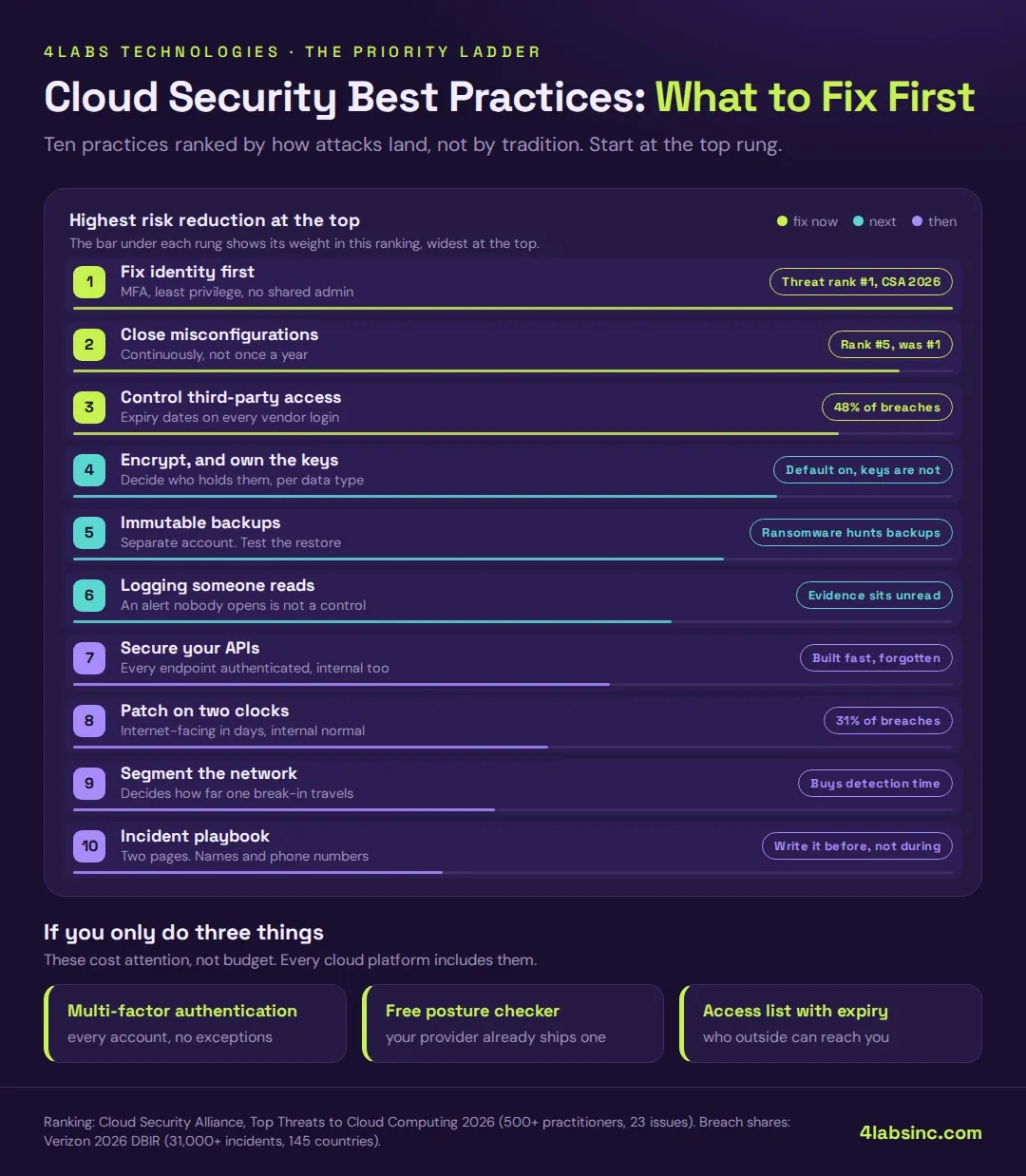
1. Fix identity first

Identity and access management is now the top-ranked cloud threat. An attacker with a valid login does not need an exploit. They walk in, and your monitoring sees a normal session.
Three things close most of this gap. Turn on multi-factor authentication for every human account, with no exceptions for executives or contractors. Apply least privilege so each account holds only the permissions its job needs. Delete shared admin accounts, because a login four people use is a login nobody owns.
First step: list every account with administrative rights in your cloud console. Most teams find more than they expected, and some belong to people who left.

2. Find and close misconfigurations continuously

A misconfiguration is a setting that quietly exposes something: a storage bucket open to the internet, a database reachable from any address, logging switched off, a default password left in place. These appear during normal work, not through carelessness. Someone opens a port to debug an issue on Friday and never closes it.
The word to hold onto is continuously. A one-off review finds today's problems. Configuration drift puts new ones in next month. Cloud security posture management tools scan settings against a baseline and flag changes; every major provider now ships a basic version at no extra cost.
First step: switch on your provider's native security posture tool and read what it already found.

3. Control third-party and vendor access

A third party is involved in 48% of breaches. Most companies grant a vendor access during onboarding and never review it. The contract ends, the integration stays, and the credential keeps working.
List every external party with access to your cloud: managed providers, contractors, SaaS integrations, agencies, auditors. For each, record what they can reach, who approved it, and when it expires. Give access an end date by default.
First step: pull the list of service accounts and API keys, and find the ones nobody can explain.

4. Encrypt data, and manage the keys deliberately

Encrypt data at rest and in transit. Every major provider does this by default now, so the interesting question is not whether you encrypt but who holds the keys.
Provider-managed keys are fine for most workloads and cost you nothing to run. Customer-managed keys give you control over rotation and revocation, and they matter when you handle regulated data or need to prove separation. Decide which data justifies the extra work rather than applying one policy everywhere.
First step: confirm encryption is on for every storage service and database, including backups and snapshots. Snapshots are the ones people miss.

5. Make backups immutable, and test the restore

Ransomware crews look for your backups before they encrypt anything. A backup sitting in the same cloud account, with the same credentials, is not a backup. It is a second copy of the problem.
Immutable backups cannot be altered or deleted for a set period, even by an administrator. Keep at least one copy in a separate account or region with separate credentials. Then test the restore, because an untested backup is a hypothesis.
First step: find the date of your last successful restore test. If there is no date, that is your answer.

6. Log everything, and make sure someone reads the alerts

Cloud platforms can log every API call, login and configuration change. Most companies turn logging on and stop there. The logs fill up, nobody watches them, and the evidence of an intrusion sits unread for months.
Decide what deserves an alert and who receives it. Failed logins on admin accounts, new accounts with elevated rights, changes to security groups, storage permissions opened to the public. Keep the alert list short enough that people still react to it.
First step: name the person who reads the alerts. If no name comes to mind, that is the gap.

7. Secure the APIs and interfaces you expose

Every cloud application exposes interfaces, and each one is a door. Insecure interfaces and APIs sit high on every cloud threat ranking because they are often built fast, documented poorly, and forgotten.
Authenticate every endpoint, including the internal ones. Rate-limit them. Validate what comes in. Keep an inventory of what you expose, because you cannot protect an endpoint nobody remembers building. Our guide to securing your website against cyber threats covers the application-layer side in more depth.
First step: list your public endpoints and check which ones require authentication.

8. Patch what faces the internet on a shorter clock

Exploited vulnerabilities account for 31% of breaches. In the cloud, the patching duty depends on your service model: with virtual machines the operating system is yours, with managed services it is the provider's.
Split your patching into two clocks. Anything reachable from the internet gets days. Anything internal gets your normal cycle. Trying to patch everything at the same speed means the urgent work waits behind the routine work.
First step: list what is reachable from the internet, then check when each item was last patched.

9. Segment your cloud networks

Segmentation decides how far an intruder gets after the first success. Flat networks let one compromised workload reach everything. Segmented networks make them stop and work for each step, which buys you detection time.
Separate production from development. Separate the systems holding sensitive data from the ones that do not. Use security groups and private subnets rather than relying on one perimeter.
First step: check whether your development environment can reach production data. It often can.

10. Write the incident playbook before you need it

The worst time to work out who calls the lawyer is during the breach. A playbook does not need to be long. It needs to name people and steps.
Cover these: who declares an incident, who can shut down a compromised account, who talks to customers, who talks to the regulator, and where the backups are. Two pages is enough for most companies. Print it, because you may not be able to log in.
First step: write down who has authority to disable a production account at 2am.
Cloud security best.webp
The ladder above shows the same ten practices against the evidence that puts each one at its height.


Which practices matter first: SMB or enterprise?

The list does not change with company size. The order does, and so does how much of it you build yourself.
A business with forty people and no security team should not start by writing an incident playbook. An enterprise with a security operations centre should not still be checking multi-factor authentication coverage by hand. Same ten practices, different entry points.

Practice SMB with no security team Enterprise with a security function
Identity Multi-factor authentication on every account this month. Remove shared admin logins Privileged access management, just-in-time elevation, quarterly access reviews
Misconfiguration Turn on the provider's free posture tool and clear what it flags Continuous posture management across accounts, with drift alerting
Third-party access Write the list of who has access, and give each entry an expiry date Vendor risk assessments, scoped roles, automated expiry
Encryption Confirm the defaults are on, including backups Customer-managed keys for regulated data, documented rotation
Backups One immutable copy in a separate account. Test the restore once Cross-region immutable copies, restore tests on a schedule
Logging Enable audit logging, send critical alerts to a real inbox Centralised logging, correlation, a monitored queue
APIs Authenticate every public endpoint API gateway policy, schema validation, abuse detection
Patching Short clock for internet-facing systems Automated pipelines with measured remediation times
Segmentation Split production from development Micro-segmentation, zero trust between workloads
Incident playbook One page with names and phone numbers Tested runbooks, tabletop exercises, defined roles

The SMB column is roughly a quarter's work for one competent engineer. The first three rows carry most of the risk reduction, and they cost very little beyond attention.
The enterprise column is not a different discipline. It is the same controls applied at a scale where manual checking stops working.

How to check where your cloud security stands today

Six checks. Each one takes minutes, and you can run them without buying anything. What matters is what a bad answer looks like.
1. Are any storage buckets or containers public? Open your storage console and filter for public access. A bad answer is any bucket you cannot explain, or a team that has to go and find out.
2. Does multi-factor authentication cover every account? Count the accounts without it. A bad answer is any number above zero on administrative accounts, or an exception made for one senior person.
3. Is the root account locked down? The root or owner account should have multi-factor authentication, no daily use, and credentials held somewhere controlled. A bad answer is anyone using it for routine work.
4. Who outside your company can reach your cloud? List every vendor, contractor and integration with access. A bad answer is a name nobody recognises, or a credential issued for a project that ended.
5. When did you last restore from backup? Not when you last took one. When you last put one back. A bad answer is a shrug.
6. Is audit logging on, and does anyone read it? Check that logging is enabled across accounts and that alerts reach a person. A bad answer is logs nobody has opened this quarter.
Most companies fail two or three of these on the first pass. That is normal, and it is a better starting point than a tool purchase, because now you know which gap to close first. Our post on IT audits in cybersecurity covers how to turn these checks into a repeating review.

Ran the six checks and did not like two of the answers? Send us what you found. We will tell you which one to close first, and roughly what it takes. No tooling commitment.

What compliance requires, and what it does not

Compliance rules tell you what to prove. They rarely tell you what to fix.
GDPR governs personal data belonging to people in the EU wherever you process it, which means your cloud region matters. Data residency rules in several countries require certain records to stay inside national borders, and your provider's region choice is how you satisfy that. Sector rules add their own layers: payment data, health records and financial services each carry specific handling requirements.
Most frameworks ask similar questions. Who can reach the data? How is it protected in storage and transit? How long do you keep it? How quickly can you report a breach? Answering those well means the controls in this guide are already in place. Our post on data privacy and security covers the handling side in more detail.
Here is the part vendors leave out. Compliance is a floor, not a security posture. A company can pass an audit with multi-factor authentication switched off for contractors, because the auditor sampled a different group. Certification proves you met a standard on a date. It does not prove you are hard to breach.
Use a framework such as the NIST Cybersecurity Framework to organise the work. Do not treat the certificate as the finish line.

When to bring in outside help

Four situations where outside help pays for itself:

  • You are moving workloads to the cloud now. Security decisions made during migration are cheap. The same decisions made afterwards mean rework.
  • Nobody owns security. When it belongs to whoever has time, it does not get done. An outside team gives it an owner while you decide whether to hire one.
  • A customer or regulator is asking questions you cannot answer. A structured assessment produces the evidence faster than an internal scramble.
  • You have had an incident. The clean-up is one job. Working out how they got in, and closing it, is another.
    Two situations where it can wait. If multi-factor authentication is not fully deployed, fix that first; no assessment will tell you anything more useful. And if you bought security tooling nobody has configured, the gap is time, not expertise.
    Our cybersecurity consulting services start with an assessment for exactly this reason: knowing the gap is cheaper than guessing at it.

How 4Labs Technologies approaches cloud security

We start with an assessment, not a tool recommendation. Identity setup, configuration state, third-party access, encryption and key handling, backup integrity, logging coverage. The output is a ranked list with effort estimates against each item, so you can see what a week of work buys compared with a quarter.
From there we do the work with you or for you. That covers identity and access design, posture monitoring, network segmentation, backup architecture, incident playbooks, and the IT infrastructure services around them. We work across AWS, Azure and Google Cloud, and across hybrid setups where part of the estate is still on-premises.
What we do not do is sell you a platform and call it a security programme. Most of the gaps we find cost nothing to close beyond attention.

Book a cloud security assessment. We look at your identity setup, your configuration, your third-party access and your backups, then hand you a ranked list with effort estimates. No tooling commitment.

Frequently asked questions

What are the most important cloud security best practices?

Start with identity: multi-factor authentication on every account, least privilege, and no shared admin logins. Then close misconfigurations continuously, and control third-party access. Those three cover most cloud breach routes. Encryption, immutable backups, logging, API security, patching, segmentation and an incident playbook complete the set.

Who is responsible for security in the cloud?

Both you and your provider, under the shared responsibility model. The provider secures the physical infrastructure, network and hardware. You secure your data, your identities and your configuration at every service level. Almost every cloud breach happens on the customer side of that line.

Is the cloud more secure than on-premise?

Cloud platforms usually offer stronger physical security, faster patching of the underlying infrastructure, and better logging than a typical company data centre. The risk shifts rather than disappears. Configuration and identity mistakes become the main exposure, and those are yours to manage.

What is the most common cause of cloud breaches?

The Cloud Security Alliance's 2026 ranking puts inadequate identity and access management first, ahead of AI-enhanced attacks and insecure third-party resources. Misconfiguration has fallen to fifth after years at the top. Verizon's 2026 data shows exploited vulnerabilities in 31% of breaches and stolen credentials in 13%.

How often should cloud security be reviewed?

Run configuration checks continuously through a posture tool rather than periodically. Review access rights quarterly, including third-party access. Test a backup restore at least twice a year. Run a full assessment annually, or whenever your architecture changes significantly.

Does a small business need cloud security tools?

Not at first. Every major cloud provider includes multi-factor authentication, audit logging and a basic posture checker at no extra cost. Most small businesses close their biggest gaps with those, plus an access list and a tested backup. Buy tooling once the free controls are fully in use.

The provider's floor is not your ceiling

Your cloud provider gives you a strong foundation. Certified data centres, hardened infrastructure, encryption available by default. None of that decides whether a contractor's old credential still works, or whether your backups survive a ransomware run.
That part is yours. The good news is that the cloud security best practices carrying the most weight are not the expensive ones. Multi-factor authentication everywhere, a configuration checker running continuously, and a list of who outside your company can reach your systems. Three moves, no procurement cycle.
Run the six checks. Fix what the answers expose. Then decide what to buy.

‹ PreviousNext ›






