Logo
Logo
ServicesIndustriesCase StudiesBlogsCareersLet's Connect
blue-white-icon
black-image
Logo
ServicesIndustriesCase StudiesBlogsCareersLet's Connect
burger-icon
hamburger
How to Select the Right ERP System for Your Business SAP
Blogs/ERP System Selection

SAP vs Odoo vs Microsoft Dynamics: How to Choose the Right ERP System in 2026

January 24, 2026
Share Now

Table of Contents

  1. 1. What Are SAP, Odoo and Microsoft Dynamics?
  2. 2. How to Choose the Right ERP System
  3. 3. Side-by-Side Comparison
  4. 4. How Much Does Each ERP System Cost
  5. 5. How to Choose the Right ERP System
  6. 6. Which ERP Fits Your Business Type
  7. 7. How 4Labs Helps You Choose
  8. 8. ERP Comparison FAQs

Key takeaways

  • Odoo has the lowest entry cost and the fastest setup, which suits small and mid-sized businesses.
  • Microsoft Dynamics 365 Business Central fits teams already living in Microsoft 365.
  • SAP goes deepest on complex operations and compliance, at the highest cost and the longest timeline.
  • Licenses are the small part of the bill. Implementation, data migration and training decide your real cost.
  • If your core process is unusual, a custom or hybrid ERP often beats forcing a standard product to fit.

What Are SAP, Odoo and Microsoft Dynamics?

An ERP system is one platform that runs your core work: finance, inventory, sales, purchasing, production and people. Instead of five tools that never agree, everyone works from the same data. That is the , and all three products below deliver it in different ways.

Secure Your ERP

Get expert insights, security briefings, and the latest innovations in your inbox.

  • Afghanistan+93
  • Albania+355
  • Algeria+213
  • Andorra+376
  • Angola+244
  • Antigua and Barbuda+1268
  • Argentina+54
  • Armenia+374
  • Aruba+297
  • Australia+61
  • Austria+43
  • Azerbaijan+994
  • Bahamas+1242
  • Bahrain+973
  • Bangladesh+880
  • Barbados+1246
  • Belarus+375
  • Belgium+32
  • Belize+501
  • Benin+229
  • Bhutan+975
  • Bolivia+591
  • Bosnia and Herzegovina+387
  • Botswana+267
  • Brazil+55
  • British Indian Ocean Territory+246
  • Brunei+673
  • Bulgaria+359
  • Burkina Faso+226
  • Burundi+257
  • Cambodia+855
  • Cameroon+237
  • Canada+1
  • Cape Verde+238
  • Caribbean Netherlands+599
  • Cayman Islands+1
  • Central African Republic+236
  • Chad+235
  • Chile+56
  • China+86
  • Colombia+57
  • Comoros+269
  • Congo+243
  • Congo+242
  • Costa Rica+506
  • Côte d'Ivoire+225
  • Croatia+385
  • Cuba+53
  • Curaçao+599
  • Cyprus+357
  • Czech Republic+420
  • Denmark+45
  • Djibouti+253
  • Dominica+1767
  • Dominican Republic+1
  • Ecuador+593
  • Egypt+20
  • El Salvador+503
  • Equatorial Guinea+240
  • Eritrea+291
  • Estonia+372
  • Ethiopia+251
  • Faroe Islands+298
  • Fiji+679
  • Finland+358
  • France+33
  • French Guiana+594
  • French Polynesia+689
  • Gabon+241
  • Gambia+220
  • Georgia+995
  • Germany+49
  • Ghana+233
  • Gibraltar+350
  • Greece+30
  • Greenland+299
  • Grenada+1473
  • Guadeloupe+590
  • Guam+1671
  • Guatemala+502
  • Guinea+224
  • Guinea-Bissau+245
  • Guyana+592
  • Haiti+509
  • Honduras+504
  • Hong Kong+852
  • Hungary+36
  • Iceland+354
  • India+91
  • Indonesia+62
  • Iran+98
  • Iraq+964
  • Ireland+353
  • Israel+972
  • Italy+39
  • Jamaica+1876
  • Japan+81
  • Jordan+962
  • Kazakhstan+7
  • Kenya+254
  • Kiribati+686
  • Kosovo+383
  • Kuwait+965
  • Kyrgyzstan+996
  • Laos+856
  • Latvia+371
  • Lebanon+961
  • Lesotho+266
  • Liberia+231
  • Libya+218
  • Liechtenstein+423
  • Lithuania+370
  • Luxembourg+352
  • Macau+853
  • Macedonia+389
  • Madagascar+261
  • Malawi+265
  • Malaysia+60
  • Maldives+960
  • Mali+223
  • Malta+356
  • Marshall Islands+692
  • Martinique+596
  • Mauritania+222
  • Mauritius+230
  • Mayotte+262
  • Mexico+52
  • Micronesia+691
  • Moldova+373
  • Monaco+377
  • Mongolia+976
  • Montenegro+382
  • Morocco+212
  • Mozambique+258
  • Myanmar+95
  • Namibia+264
  • Nauru+674
  • Nepal+977
  • Netherlands+31
  • New Caledonia+687
  • New Zealand+64
  • Nicaragua+505
  • Niger+227
  • Nigeria+234
  • North Korea+850
  • Norway+47
  • Oman+968
  • Pakistan+92
  • Palau+680
  • Palestine+970
  • Panama+507
  • Papua New Guinea+675
  • Paraguay+595
  • Peru+51
  • Philippines+63
  • Poland+48
  • Portugal+351
  • Puerto Rico+1
  • Qatar+974
  • Réunion+262
  • Romania+40
  • Russia+7
  • Rwanda+250
  • Saint Kitts and Nevis+1869
  • Saint Lucia+1758
  • Saint Pierre & Miquelon+508
  • Saint Vincent and the Grenadines+1784
  • Samoa+685
  • San Marino+378
  • São Tomé and Príncipe+239
  • Saudi Arabia+966
  • Senegal+221
  • Serbia+381
  • Seychelles+248
  • Sierra Leone+232
  • Singapore+65
  • Slovakia+421
  • Slovenia+386
  • Solomon Islands+677
  • Somalia+252
  • South Africa+27
  • South Korea+82
  • South Sudan+211
  • Spain+34
  • Sri Lanka+94
  • Sudan+249
  • Suriname+597
  • Swaziland+268
  • Sweden+46
  • Switzerland+41
  • Syria+963
  • Taiwan+886
  • Tajikistan+992
  • Tanzania+255
  • Thailand+66
  • Timor-Leste+670
  • Togo+228
  • Tonga+676
  • Trinidad and Tobago+1868
  • Tunisia+216
  • Turkey+90
  • Turkmenistan+993
  • Tuvalu+688
  • Uganda+256
  • Ukraine+380
  • United Arab Emirates+971
  • United Kingdom+44
  • United States+1
  • Uruguay+598
  • Uzbekistan+998
  • Vanuatu+678
  • Vatican City+39
  • Venezuela+58
  • Vietnam+84
  • Wallis & Futuna+681
  • Yemen+967
  • Zambia+260
  • Zimbabwe+263
Our Services
Digital Marketing
Staff Augmentation
IT Infrastructure
ERP Solutions
Software Development
Web & App Development
Industries
Cryptocurrency and Blockchain
Banking, Financial Services, and Insurance (BFSI)
Lending and FinTech
Oil and Gas
Energy and Utilities
Automotive and Manufacturing
Agriculture
Real Estate
E-commerce and Retail
Case Studies
Financial Services Test Automation
AI-Driven Customer Risk Profiling
Elevating Mobile Performance
Jewelry Client Transformation
AI Underwriting Revolution
Advanced Cybersecurity Solutions
Eyewear Retailer Transformation
Revolutionizing Manufacturing Operations
Offshore Development Excellence
Company

About Us

Careers

Let's Connect

Business Referral

Engagement Model

Partnership Programs

Resources

Blogs

footer1-iconfooter2-iconiso_iconiso_icon2

4labsicon

Copyright © 2026 4Labs Technologies. All Rights Reserved.

Privacy Policy

Terms & Conditions

Accessibility

fb-icon
twitter-icon
instagram-icon
linkedin-icon
main benefit of an ERP system

SAP: Business One and S/4HANA

SAP is the oldest name in ERP and the deepest. It sells two products that matter here. SAP Business One targets smaller companies. SAP S/4HANA is the enterprise platform, built for complex supply chains, multi-country accounting and heavy compliance.
Strengths: mature finance, strong manufacturing and supply chain modules, and a global partner network. Trade-offs: higher license costs, longer projects and a steeper learning curve. SAP earns its place when the process complexity is real, as our post on SAP ERP for large enterprises explains.

Odoo: Modular ERP for SMEs

Odoo is modular and open source. You start with the apps you need, such as accounting, inventory and CRM, then switch on more as you grow. The community edition is free; the paid edition adds support and the full app catalogue.
Strengths: the lowest entry price, quick setup and a clean interface people pick up fast. Trade-offs: deep customization needs a good partner, and some industry features that ship as standard in SAP have to be built. Our guide to Odoo ERP for SMEs covers the module set.

Microsoft Dynamics 365 Business Central

Business Central is Microsoft's ERP for small and mid-sized companies. It connects to Outlook, Excel, Teams and Power BI out of the box, so reporting and approvals sit where your team already works.
Strengths: familiar interface, strong finance, and a huge partner and app ecosystem. Trade-offs: costs climb as you add users and premium modules, and heavy customization needs specialist help. See our post on Microsoft Dynamics cloud ERP for the deployment picture.

SAP vs Odoo vs Microsoft Dynamics: How to Choose the Right ERP System in 2026

Most ERP shortlists start with a brand name and end with a budget shock. Someone recommends SAP, a friend swears by Odoo, and the finance lead already pays for Microsoft 365. Six weeks later the quotes land, and the numbers are nothing like the plan.
SAP vs Odoo vs Microsoft Dynamics is the wrong question to start with. The right one is what your business will need in three years, and which system your team can actually run.
This guide compares the three on cost, setup time, customization and fit. You'll get 2026 price ranges from public sources, real implementation timelines, a 7-question test that points to one system, and an honest look at when none of the three is the answer.

Key takeaways

  • Odoo has the lowest entry cost and the fastest setup, which suits small and mid-sized businesses.
  • Microsoft Dynamics 365 Business Central fits teams already living in Microsoft 365.
  • SAP goes deepest on complex operations and compliance, at the highest cost and the longest timeline.
  • Licenses are the small part of the bill. Implementation, data migration and training decide your real cost.
  • If your core process is unusual, a custom or hybrid ERP often beats forcing a standard product to fit.

SAP vs Odoo vs Microsoft Dynamics: Side-by-Side Comparison

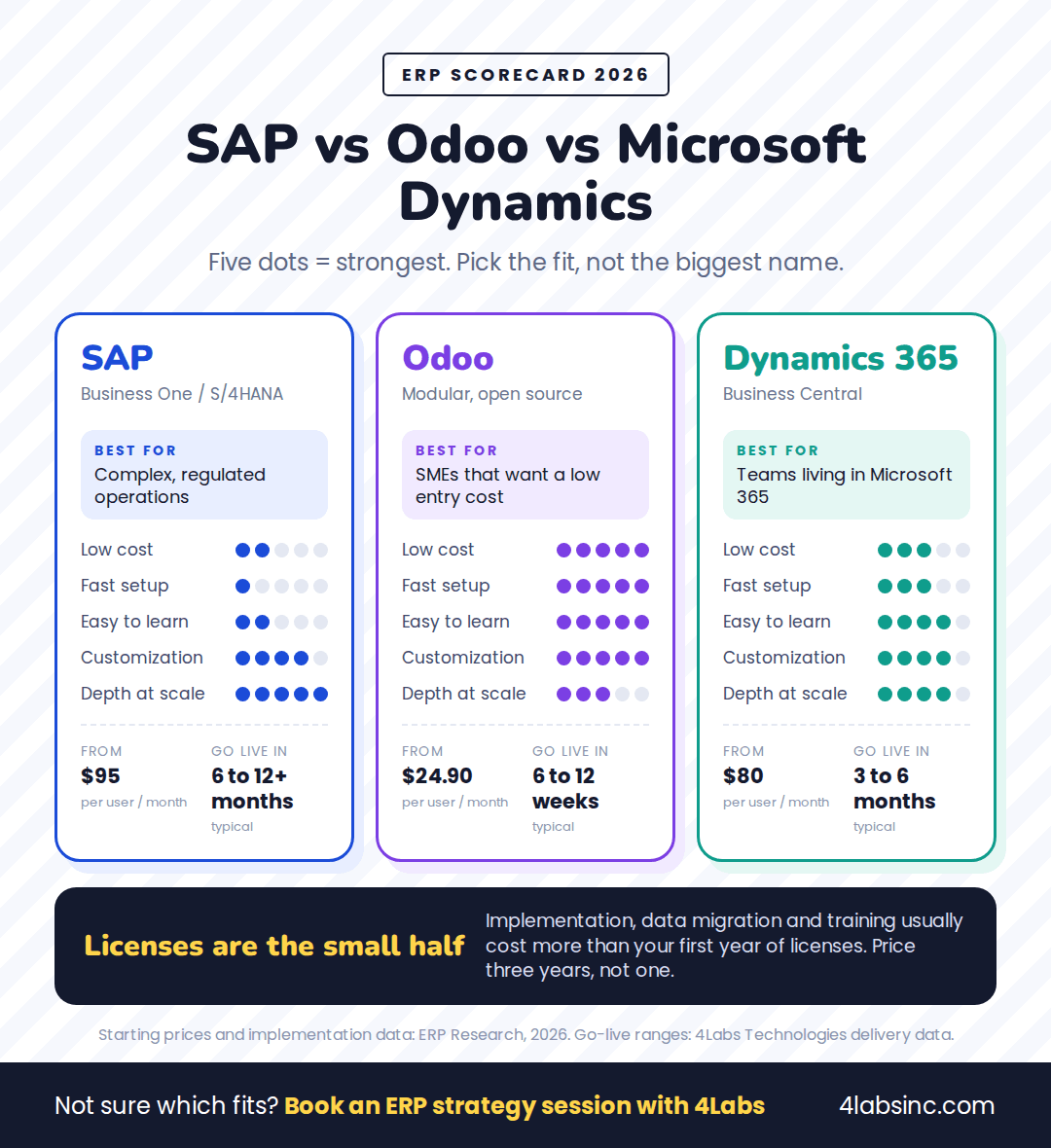
Here is the short version. Odoo wins on price and speed, Business Central wins on ecosystem fit, and SAP wins on depth.
SAP, Odoo and Microsoft Dynamics ERP comparison scorecard.png

ERP scorecard: how the three systems score on cost, speed, ease, customization and depth.

FactorSAP (Business One / S/4HANA)OdooMicrosoft Dynamics 365 Business Central
Best forComplex operations, strict compliance, multi-country groupsSMEs that want modules and a low entry costTeams already running Microsoft 365
Starting license$95 per user per month (Business One); $180 (S/4HANA Public Cloud)$24.90 per user per month$80 per user per month
Typical setup time6 to 12+ months for S/4HANA6 to 12 weeks3 to 6 months
CustomizationDeep, but changes are costlyVery flexible; open source codeFlexible through apps and extensions
EcosystemLarge global partner networkGrowing app store and communityOutlook, Excel, Teams, Power BI
Learning curveSteepGentleGentle for Microsoft users
Watch out forCost and project lengthCustomization debt without a good partnerLicence creep as users and modules grow

Prices are starting rates published by ERP Research in 2026. Your quote will differ by region, module mix and partner, so treat these as a starting line, not a final bill.

How Much Does Each ERP System Cost in 2026?

ERP pricing has two halves: the license you pay every month, and the ERP implementation cost that gets you live. The second half is usually the bigger number.

SystemStarting licenseTypical implementation
SAP Business One$95 per user per month$15,000 to $150,000
SAP S/4HANA Public Cloud$180 per user per month$75,000 to $500,000
Odoo$24.90 per user per month$5,000 to $200,000
Microsoft Dynamics 365 Business Central$80 per user per month$25,000 to $250,000

Source: ERP Research, 2026 starting rates.

What a Small Business Actually Pays

Take a 20-user company. On Odoo, licenses run near $6,000 a year. On Business Central, about $19,200. On SAP Business One, about $22,800. Add implementation, and year one looks very different from year two.

Top10ERP puts a business with $1 million to $10 million in revenue at $1,500 to $10,000 a year for software. Implementation adds $1,500 to $15,000, so the first year lands between $3,000 and $25,000. The same guide notes that ERP spending often runs between 1% and 3% of annual revenue.
Compare the total cost of ownership over three years, not one. A cheap license with a heavy custom build can cost more by year three than a pricier product that fits out of the box.

The Costs Nobody Quotes You

  • Data migration. Cleaning and moving years of records takes longer than anyone plans.
  • Integrations. Each connection to your bank, e-commerce store, payroll or CRM is separate work.
  • Customization. Every change you make is a change you maintain at the next upgrade.
  • Training. Budget real hours, not a one-hour demo.
  • Support. Annual maintenance and partner retainers keep running after go-live.
  • Internal time. Your own team will spend weeks on this. That cost is real, even if it never hits an invoice.

Want a cost estimate for your own user count and modules? Our ERP team will size it with you, licenses and implementation both. Get an ERP Cost Estimate

How Long Does Each ERP Take to Implement?

Timelines track complexity, not vendor marketing. These are the ranges we see on our own ERP projects

PlatformTypical go-liveWhat drives the length
Odoo (MSME rollouts)6 to 12 weeksModule count, data cleanliness, few custom flows
Microsoft Dynamics 365 (mid-market)3 to 6 monthsIntegrations, reporting, approval workflows
SAP S/4HANA (enterprise)6 to 12+ monthsMulti-entity finance, manufacturing, compliance

Two things shorten any project: clean data and one decision-maker. Two things stretch it: mid-project scope changes and a team that only joins at testing.
A phased rollout usually beats a big-bang launch. Start with finance and inventory, prove it works, then add sales, manufacturing or HR. People learn one module at a time, and problems stay small.

How to Choose the Right ERP System: 7 Questions

To choose the right ERP system, answer these seven questions before you book a single demo. Your answers point to one of the three systems far faster than a feature list does.

1. What is breaking today?

Name the actual pain: month-end takes two weeks, stock counts are wrong, cash flow is guesswork, or orders get lost between teams. Fix that first. If reporting is the problem, look at how ERP improves financial management before you shop for modules you will not use.

2. How many users will you license in three years?

Count every person who needs access, not just finance. Then project growth, because scalability is where budgets break. At 10 users the price gap between the three is small. At 80 users it decides the budget.

3. Which of your processes are genuinely unusual?

Every owner believes their business is unique. Usually two or three processes really are. List them. If standard products cover the rest, you need configuration, not a rebuild.

4. What already runs your office?

If your company lives in Outlook, Excel and Teams, Business Central removes friction on day one. If you use Google Workspace or a mix, that advantage disappears and Odoo or SAP compete on their own merits.

5. What compliance and tax rules apply?

Multi-country VAT or GST, audit trails, industry regulation and statutory reporting all raise the bar. SAP handles this depth natively. Odoo and Business Central handle it with the right localization and partner work.

6. Who owns the system after go-live?

Name the person now. An ERP without an internal owner drifts within a year. If nobody can own it, plan for a managed support arrangement or lean on IT consulting to fill the gap.

7. What can you spend in year one?

Set a total that includes licenses, implementation, data migration and training. Then ask each vendor to quote against that number. Any partner who cannot answer clearly is a partner who will surprise you later.

Read your answers together. Mostly standard processes with a tight budget point to Odoo. A Microsoft-heavy team with mid-market complexity points to Business Central. Multi-entity, regulated or manufacturing-led operations point to SAP.

Still torn between two systems? Walk through your answers with an ERP consultant and leave with a shortlist and a budget range. Book an ERP Strategy Session

Which ERP Fits Your Business Type?

Business typeUsual best fitWhy
Retail and e-commerceOdooBuilt-in inventory, POS and store connectors at a low entry cost
ManufacturingSAP, or Business Central for lighter operationsProduction planning, bills of materials, quality and traceability run deep in SAP
Professional servicesBusiness Central or OdooProjects, timesheets and billing, with reporting in tools staff already use
Distribution and logisticsSAP or Business CentralMulti-warehouse stock, demand planning, tight finance links
Multi-entity groupsSAPMulti-company, multi-currency consolidation as standard
Microsoft-heavy teamsBusiness CentralOutlook, Excel, Teams and Power BI work together from day one
Fast-growing startupsOdooStart with two apps, add more as the business settles

There is no single best ERP for small business; these are starting points, not rules. A 30-person manufacturer with simple processes may run Odoo happily, and a services firm with heavy compliance may still need SAP. See how we rebuilt operations for a manufacturer in our manufacturing case study.
Whichever you pick, plan for what comes next. AI, machine learning and IoT features now ship inside all three platforms, and clean ERP data is what makes any of it useful. Pair that with proper data analytics and the system starts answering questions instead of just recording them.

When None of the Three Fits: Custom and Hybrid ERP

Sometimes the honest answer is that no standard product fits. Watch for these signs:

  • Your core process is your competitive edge, and every demo needs heavy workarounds.
  • You would pay for dozens of modules to use four.
  • Your industry has rules the big platforms treat as an afterthought.
  • You already run strong tools for part of the work and only need the gaps filled.
  • Per-user licensing punishes you for adding seasonal or shop-floor staff.

Two routes work here. A custom ERP is built around your processes, so you own the code and pay no per-user license. A hybrid setup keeps a standard core, such as finance, and adds custom modules for the parts that make you money.

Both need an ERP service provider who can build and maintain software, not just configure a product. That is where ERP software development and implementation services and wider custom software development come together.

What Actually Sinks ERP Projects

The platform is rarely the reason a project fails. These five are:

  1. No clear owner. Decisions stall, and the project drifts between departments.
  2. Dirty data. Duplicate customers and wrong stock counts move straight into the new system.
  3. Scope creep. Every new request adds weeks and quietly rewrites the budget.
  4. Skipped training. People keep their spreadsheets, and the ERP holds half the truth.
  5. Big-bang go-live. Everything switches at once, and one bad week hits the whole business.
    All five are avoidable. Our guide to ERP implementation best practices covers the planning, data cleanup and change management that keep a rollout on track.

How 4Labs Helps You Choose and Implement

4Labs Technologies is a platform-neutral ERP service provider. We work across all three systems, so the recommendation follows your business, not a single vendor's license.

  • ERP consulting: we map your processes, score the options and give you a shortlist with a budget range.
  • Implementation: SAP S/4HANA, Microsoft Dynamics 365 and Odoo, delivered in phases.
  • Custom and hybrid ERP: built when standard products cannot cover your core work.
  • Migration: moving data and history off legacy systems without losing the audit trail.
  • Integration: connecting ERP to your CRM, e-commerce, banking, payroll and reporting tools.
  • Support and optimization: full-lifecycle help after go-live, not a handover and goodbye.

The numbers behind that: 220+ projects delivered, 300+ clients, a 98% client retention rate, and delivery teams across the US, UK, Canada, GCC, India, Singapore and Australia. Engagement is flexible too, from fixed scope to a dedicated team, as our engagement models explain.

Ready to move? We select, build, migrate and support ERP systems for growing businesses. No commitment required. Begin Your ERP Transformation

ERP Comparison FAQs

Which is better for a small business: SAP, Odoo or Microsoft Dynamics?

For most small businesses, Odoo fits best. It starts near $24.90 per user per month, goes live in 6 to 12 weeks and lets you add modules as you grow. Choose Business Central if your team lives in Microsoft 365, and SAP if compliance or manufacturing complexity is high.

How much does an ERP system cost per user?

ERP Research lists 2026 starting rates of $24.90 per user per month for Odoo and $80 for Microsoft Dynamics 365 Business Central. SAP Business One starts at $95, and SAP S/4HANA Public Cloud at $180. Implementation is charged separately and usually costs more than the first year of licenses.

Is Odoo powerful enough to replace SAP?

For many small and mid-sized companies, yes. Odoo covers finance, inventory, sales, purchasing, manufacturing and HR. SAP still leads on deep supply chains, multi-entity consolidation and heavy regulation. Match the tool to your complexity, not to the brand.

What is the difference between SAP Business One and SAP S/4HANA?

Business One is SAP's product for smaller companies, with lower cost and a shorter rollout. S/4HANA is the enterprise platform, built for large volumes, complex processes and multi-country operations. Business One suits growing firms; S/4HANA suits groups with serious scale.

Can Microsoft Dynamics 365 Business Central handle manufacturing?

Yes, for light to mid-level manufacturing: bills of materials, production orders and capacity planning. Complex shop-floor scheduling, quality management and deep traceability usually need SAP or a specialist add-on. Test your real production process during the demo.

When should a business build a custom ERP instead of buying one?

Build custom when your core process is your advantage, when standard demos need constant workarounds, or when per-user licensing punishes a large team. A hybrid setup, standard finance plus custom modules, often gives you control and speed together.

Pick the System You Can Run, Not the Biggest Name

SAP, Odoo and Microsoft Dynamics all work. The difference is fit: your complexity, your budget, your team and the tools you already use.
Answer the seven questions, price three years instead of one, and test each system against the processes that actually make you money. If nothing fits, build the parts that matter and buy the rest.

Not sure which way to go? Talk it through with our ERP team and leave with a clear recommendation. Book an ERP Strategy Session


‹ PreviousNext ›